Mint Style: Fresh Procreate Color Palette
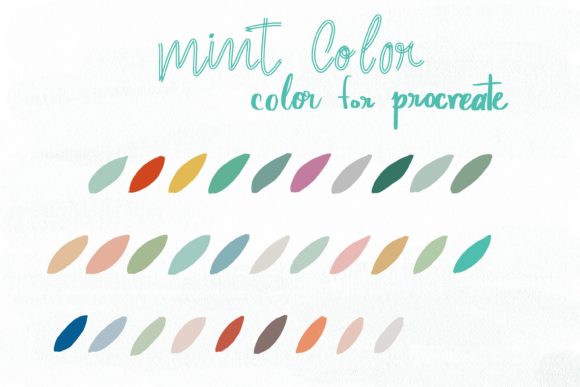
Creativity often stalls not because of a lack of skill, but because of decision fatigue. When you open a blank canvas in Procreate, the infinite possibilities can be paralyzing. This is where a curated color system becomes more than just a tool; it becomes a creative partner. The Mint Style color palette offers a refreshing solution for digital artists, designers, and hobbyists who want to streamline their workflow while maintaining a distinct, modern aesthetic. By providing a harmonious set of tones centered around cool, crisp greens and complementary neutrals, this palette allows you to jump straight into the act of creation rather than spending hours tweaking hue sliders.
The Psychology and Utility of Mint Tones
Mint is frequently misunderstood as merely a trendy accent color, but in design theory, it serves a much deeper purpose. It sits at the intersection of calm and clarity. Unlike stark whites or aggressive primaries, mint tones evoke a sense of balance and renewal. For creators working on branding projects, editorial illustrations, or personal art journals, this psychological impact is invaluable. The Mint Style palette leverages this by offering a range of values from pale, airy tints to deeper, sophisticated shades that ground the composition.
What makes this specific collection interesting is its versatility. It is not limited to literal representations of nature. While it naturally suits botanical illustrations and organic patterns, its clean lines and cool temperature make it equally effective for tech-focused UI designs, minimalist typography, and modern abstract art. The palette removes the guesswork of color matching, ensuring that every layer you add interacts harmoniously with the last. This consistency is crucial for professionals who need to deliver polished results under tight deadlines.
Technical Integration with Procreate
To get the most out of these colors, understanding the technical ecosystem is essential. This set includes a single .swatch file, designed specifically for the Procreate app on iPad. This format ensures that the colors are instantly accessible within your existing library, allowing for seamless integration into your current workflow. However, compatibility is key. These files are ONLY compatible with the Procreate app.
To utilize this palette effectively, you will need the following setup:
- An iPad Pro or standard iPad capable of running the latest version of Procreate.
- An Apple Pencil or a third-party stylus that supports pressure sensitivity, allowing for nuanced brush control.
- The Procreate App installed and updated.
Once imported, the swatch file appears in your color panel. This immediate access means you can switch between your primary mint tones and secondary accents without breaking your flow state. For educators and freelancers, this efficiency translates directly into billable hours saved and a more professional presentation process.
Creative Applications Across Industries
The true value of a color palette lies in its application. Different users can adapt Mint Style to meet diverse goals, whether they are building a brand identity or illustrating a children’s book. Here is how various creators can leverage this toolkit:
Branding and Marketing
For marketers and small business owners, consistency is the cornerstone of brand recognition. Mint tones convey freshness, health, and innovation. You can use this palette to design social media graphics, logo concepts, or packaging mockups. The cooler tones work exceptionally well for wellness brands, eco-friendly products, or fintech startups looking to appear approachable yet trustworthy. By sticking to the predefined swatches, you ensure that your Instagram posts, stories, and ads maintain a cohesive visual language that audiences can instantly recognize.
Digital Illustration and Character Design
Illustrators often struggle with lighting and shadow consistency. This palette provides pre-balanced shadows and highlights within the mint spectrum. When designing characters, you can use the lighter tints for skin tones or fabric highlights and the deeper shades for shading and depth. This reduces the cognitive load of color selection, allowing you to focus on anatomy, expression, and narrative. The result is artwork that feels unified and professionally finished, even if you are working quickly.
UI/UX and Web Design Prototyping
Designers prototyping apps or websites on the iPad can use this palette to create high-fidelity mockups. Mint is excellent for call-to-action buttons, success states, and background elements that need to recede visually while keeping the interface feeling open and airy. Using the Mint Style swatches ensures that your contrast ratios remain accessible and aesthetically pleasing, providing a solid foundation before you move to code.
Strategies for Effective Use
Having a beautiful palette is only the first step. To keep your results clear, effective, and original, consider these practical approaches:
- Establish Hierarchy: Decide which mint shade is your dominant color and which are accents. Use the boldest tones for focal points and the paler tints for backgrounds. This prevents the design from feeling flat or chaotic.
- Combine with Neutrals: While the palette is comprehensive, pairing mint with stark blacks, warm grays, or crisp whites can add sophistication. Use the mint tones to inject personality into an otherwise neutral layout.
- Experiment with Texture: Procreate’s brush engine allows you to apply these colors with various textures. Try using the mint shades with watercolor brushes for a soft, organic feel, or with hard-edged ink brushes for a modern, graphic look. The color remains consistent, but the mood shifts dramatically based on the brush choice.
- Limit Your Selection: Just because the palette is available doesn’t mean you must use every color in every piece. Restricting yourself to three or four swatches from the set can lead to stronger, more impactful compositions.
Keeping Your Workflow Organized
For freelancers and publishers managing multiple projects, organization is vital. Import the Mint Style swatch into a dedicated folder within Procreate. Name your layers clearly and use color coding that corresponds to the palette. This practice not only helps you stay organized during the creation process but also makes it easier to hand off files to clients or collaborators. When your color choices are intentional and standardized, revisions become simpler, and the final output is more polished.
Ultimately, this palette is about removing friction. It invites you to explore unique pictures, paint freely, and tackle design projects with confidence. Whether you are an educator creating engaging visual aids, a blogger designing custom headers, or an entrepreneur sketching out a new product idea, Mint Style provides the structural support you need to let your creativity flourish. By grounding your work in a thoughtful, cohesive color system, you elevate your digital art from simple sketches to compelling visual communications.