Halloween Palette: A Procreate Color Set for Seasonal Digital Art
Digital illustration offers artists an expansive range of tools, yet color selection remains one of the most time-consuming aspects of the creative process. For artists working within the Procreate ecosystem on iPad, curated color sets can streamline workflow and ensure visual consistency. The Halloween Palette is a specialized digital asset designed to assist illustrators in creating seasonal artwork. This article evaluates the utility, compatibility, and practical applications of this palette to help users determine if it aligns with their artistic goals.
Understanding the Halloween Palette
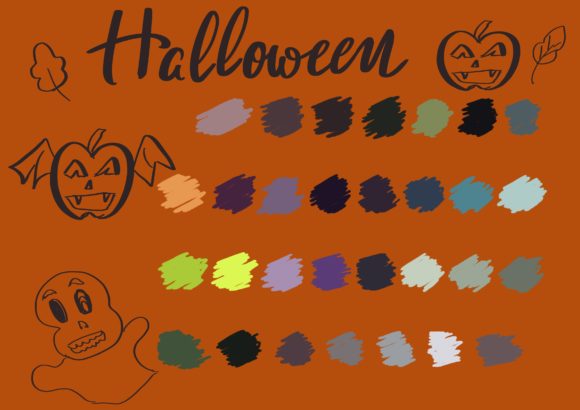
The Halloween Palette is a collection of pre-selected colors formatted specifically for the Procreate application. It is distributed as a single .swatch file, which is the native format for color libraries in Procreate. The primary function of this tool is to provide a cohesive set of hues that evoke the traditional aesthetics associated with Halloween. These typically include deep oranges, muted purples, shadowy blacks, eerie greens, and bone whites.
Unlike standard color wheels that require manual adjustment to find harmonious combinations, this palette offers a pre-configured spectrum. This allows artists to bypass the initial phase of color theory experimentation and move directly into sketching, painting, or designing. The set is intended for use in various projects, including character design, background illustration, greeting cards, and social media graphics.
Technical Requirements and Compatibility
Before acquiring or utilizing the Halloween Palette, it is essential to understand its technical constraints. This product is not a standalone application but a supplementary file that requires specific hardware and software to function. Users must have the following:
- Hardware: An iPad Pro or any compatible iPad model capable of running the latest versions of Procreate.
- Input Device: An Apple Pencil or a third-party stylus that supports pressure sensitivity. While basic touch input may allow for color selection, the intended experience relies on the precision and variable line weight provided by pressure-sensitive pens.
- Software: The Procreate app, purchased from the App Store. The palette is incompatible with other digital art software such as Adobe Fresco, Clip Studio Paint, or Photoshop due to the proprietary nature of the
.swatchfile format.
This exclusivity means that artists who work across multiple platforms cannot use this specific file outside of the Apple ecosystem. For those deeply integrated into the Procreate workflow, however, the integration is seamless.
Benefits of Using a Curated Seasonal Palette
The primary advantage of using a themed palette like the Halloween set is efficiency. Color harmony is critical in digital art, and selecting disjointed colors can result in visuals that feel unbalanced or amateurish. By providing a limited, curated range, the palette encourages cohesion. Artists can select colors with confidence, knowing they have been chosen to complement one another.
Furthermore, thematic palettes can serve as a source of inspiration. When facing creative block, having a restricted set of colors can force innovative approaches to shading and lighting. For example, instead of relying on standard black for shadows, an artist might use a deep purple from the palette to create a more atmospheric and vibrant night scene. This constraint-based approach often leads to more unique and stylized results.
For commercial artists or content creators, consistency is key. If an illustrator is producing a series of Halloween-themed posts or products, using a standardized palette ensures that all pieces look like part of a unified collection. This is particularly valuable for branding purposes or when creating merchandise lines.
Tradeoffs and Considerations
While convenient, relying on a pre-made palette has limitations. The most significant tradeoff is the potential lack of customization. A static set of colors may not suit every artistic style. For instance, an artist preferring pastel goth aesthetics or hyper-realistic horror may find the traditional orange-and-black scheme too restrictive or cliché. In such cases, the palette may require significant modification, negating the time-saving benefit.
Additionally, the value of a digital color palette is subjective. Experienced colorists may prefer building their own libraries from scratch, allowing for complete control over hue, saturation, and brightness. For these users, a pre-packaged set may offer little additional value beyond minor convenience. Beginners, conversely, may benefit more from the guidance a curated set provides, though they risk becoming dependent on external tools rather than developing their own color theory skills.
It is also important to note that the palette does not include brushes, textures, or tutorials. It is strictly a color resource. Users expecting a comprehensive kit with additional assets may be disappointed. The focus is solely on color selection, meaning the quality of the final artwork still depends entirely on the user’s skill level and technique.
Ideal Use Cases
The Halloween Palette is a strong fit for several specific scenarios:
- Seasonal Content Creation: Social media managers and influencers who need to produce timely, themed graphics quickly can benefit from the immediate availability of appropriate colors.
- Educational Projects: Art teachers or students working on holiday-themed assignments can use the palette to ensure class projects maintain a consistent visual theme.
- Rapid Prototyping: Concept artists who need to mock up Halloween-themed ideas for clients can use the palette to speed up the initial coloring phase.
- Beginner Practice: New Procreate users can use the palette to practice blending and layering without the added cognitive load of selecting colors.
In these contexts, the palette acts as a functional tool that reduces friction in the creative process. It allows the artist to focus on composition, line work, and narrative rather than spending excessive time adjusting color sliders.
When to Consider Alternatives
There are situations where alternative approaches may be more effective. If an artist works in a style that diverges significantly from traditional Halloween imagery—such as sci-fi horror or abstract expressionism—a general-purpose palette or a custom-built library may be more versatile. Additionally, artists who use multiple devices or software programs should consider creating their own color libraries in universal formats or manually recreating them in each program to maintain workflow flexibility.
For those seeking extensive resources, bundled packs that include brushes, textures, and templates alongside colors might offer better value. However, these bundles are often larger, more expensive, and may contain unused assets. The Halloween Palette’s singular focus makes it a lightweight, low-commitment option for those who only need color assistance.
Making the Decision
Deciding whether to incorporate the Halloween Palette into your workflow depends on your current needs and skill level. If you frequently create seasonal content in Procreate and struggle with color consistency, this tool offers a practical solution. It eliminates the guesswork involved in selecting thematic hues and ensures a professional, cohesive look.
However, if you are an advanced colorist with established libraries, or if you work outside the Procreate environment, the utility of this specific file is limited. Evaluate your typical project requirements. If speed and thematic accuracy are priorities, the palette is a worthwhile addition. If customization and cross-platform compatibility are more important, investing time in building your own color sets may yield better long-term results.
Ultimately, the Halloween Palette serves as a specialized aid for digital artists. It is not a replacement for fundamental artistic skills but a resource that can enhance efficiency and visual harmony in specific contexts. By understanding its capabilities and limitations, users can make an informed decision about whether it supports their creative objectives.