Mastering the Procreate Gradient Color Palette for Digital Art
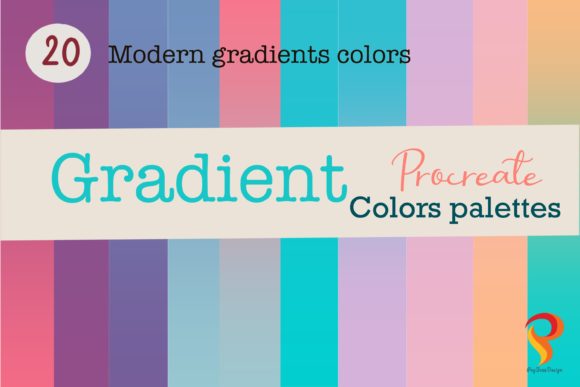
In the evolving landscape of digital illustration, color theory remains the cornerstone of compelling visual storytelling. For artists using the iPad, the Procreate Gradient Color Palette has emerged as an essential tool for achieving seamless transitions and atmospheric depth. Unlike traditional painting, where mixing pigments requires physical effort and intuition, digital gradients offer precision and repeatability. However, selecting the right hues to blend is often the most challenging aspect of the process. This is where curated collections, such as The Modern Colour Gradients Procreate Color Palette, transform the workflow from tedious trial-and-error to intuitive creation.
This article explores the functionality, application, and artistic value of utilizing specialized gradient palettes within the Procreate ecosystem. Whether you are a seasoned professional illustrator, a hobbyist lettering artist, or a business owner creating social media assets, understanding how to leverage these harmonious color sets can significantly elevate the quality of your digital output.
Understanding the Mechanics of Digital Gradients
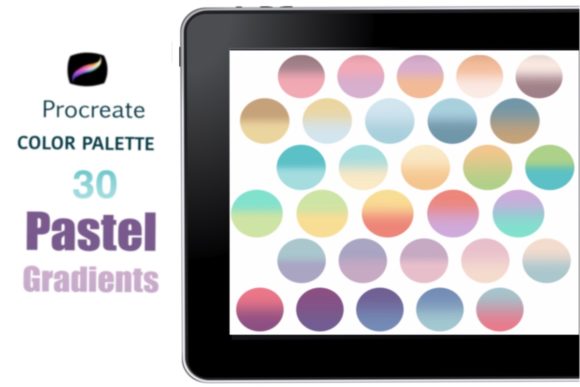
A gradient is more than just a fade from one color to another; it is a bridge that guides the viewer’s eye across the canvas. In Procreate, gradients are constructed by layering colors and blending them to create smooth transitions. The Procreate Gradient Color Palette simplifies this by providing pre-selected groups of colors that are mathematically and aesthetically designed to work together.
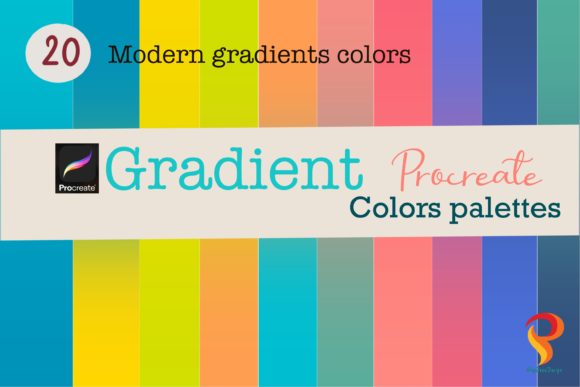
Typically, a high-quality palette like The Modern Colour Gradients contains around 20 matching colors. These are not random selections but are carefully curated to ensure that when placed side by side, they create a natural flow. The primary advantage here is harmony. When artists manually pick colors, there is a risk of choosing hues with conflicting saturation or brightness levels, resulting in muddy or jarring transitions. A dedicated gradient palette mitigates this risk, allowing creators to focus on composition and form rather than color correction.
The Role of Harmonious Colors
The core feature of these palettes is their inherent harmony. Each set is designed so that every color compleits its neighbor. This means you do not necessarily have to use every single color in the palette for a single project. Instead, you can select a subset—perhaps three to five adjacent colors—to build a specific mood. This flexibility allows for endless variations while maintaining a cohesive look. For instance, a sunset scene might utilize the warm oranges and deep purples from one end of the spectrum, while a cyberpunk cityscape might rely on the neon blues and magentas from another section.
Practical Application: Building Gradients in Procreate
Implementing these palettes into your workflow is straightforward, yet it requires a understanding of Procreate’s specific tools. The process generally involves three stages: selection, application, and blending. Here is a practical guide to achieving professional-grade gradients using these color sets.
- Installation and Setup: First, ensure the color palette is installed in your Procreate app. Much like brush sets, color palettes can be uploaded and organized within the app’s library. This ensures they are readily accessible across all your projects without the need for repetitive importing.
- Brush Selection: To paint each color of the gradient on your canvas, use a standard Monoline brush. This brush type is ideal because it provides consistent opacity and edge definition, which is crucial for the initial placement of color blocks. Avoid textured brushes at this stage, as they can complicate the blending process.
- Color Placement: Select your chosen colors from the Procreate Gradient Color Palette. Paint them side by side on your canvas. You might place a dark blue next to a lighter teal, followed by a soft white. The goal is to cover the area where you want the gradient to appear with distinct bands of color.
- Blending with Gaussian Blur: This is the critical step. In Procreate, tap on the Magic Wand icon in the top menu to access adjustments. Select Gaussian Blur. By sliding the control to the right, you will see the hard edges between your color bands soften and merge. Continue sliding until you are satisfied with the mixture. This method creates a smooth, professional gradient effect that mimics airbrushed techniques.
It is important to note that this technique works on any iPad model compatible with Procreate. The software handles the computational heavy lifting, meaning the hardware does not need extreme sensitivity to pressure for this specific blending technique. This makes it an inclusive tool for artists using older iPad models or those who prefer styluses without pressure sensitivity.
Real-World Applications and Use Cases
The versatility of the Procreate Gradient Color Palette extends far beyond simple background fills. Its utility spans various disciplines within digital art and design. Below are several scenarios where these palettes prove invaluable.
Lettering and Typography
One of the most popular uses for gradient palettes is in hand-lettering. Text becomes instantly more dynamic when filled with a vibrant gradient. Artists can use the gradient as a background for their lettering or apply it directly to the forms of the letters. By using the Modern Colour Gradients, typographers can ensure that the text remains legible while adding visual interest. The harmonious nature of the colors prevents the text from looking chaotic, ensuring that the message remains clear.
Backgrounds and Atmospheres
For illustrators, backgrounds set the tone of the entire piece. A well-executed gradient can simulate sky, water, light sources, or abstract spaces. Using a pre-made palette allows for rapid iteration. An artist can quickly test five different atmospheric moods by swapping out gradient sets, a process that would take significantly longer if mixing colors manually. This efficiency is particularly beneficial for professionals working under tight deadlines.
Social Media and Branding Assets
Business owners and content creators often need eye-catching graphics for Instagram stories, posts, or website headers. Gradients are a dominant trend in modern graphic design because they convey energy and modernity. By utilizing a consistent Procreate Gradient Color Palette, brands can maintain visual consistency across their digital presence. The ability to save and reuse these palettes ensures that all marketing materials share a cohesive color identity.
Evaluating Suitability: Is This Tool Right for You?
While gradient palettes offer significant advantages, it is essential to evaluate whether they align with your specific artistic needs. Consider the following factors:
- Style Compatibility: If your work relies heavily on flat design or high-contrast comic styles, gradients may play a smaller role. However, for digital painting, concept art, and modern graphic design, they are indispensable.
- Learning Curve: The technical process of using Gaussian Blur is simple, but mastering the artistic eye for where to place gradients takes practice. Beginners may find pre-made palettes helpful as training wheels to understand which colors work well together.
- Customization Needs: While The Modern Colour Gradients Procreate Color Palette offers 20 matching colors, some advanced users may prefer creating their own custom gradients from scratch. However, even experienced artists often use curated palettes as a starting point, tweaking individual hues to suit specific lighting conditions.
Limitations and Considerations
It is worth noting that relying solely on pre-made palettes can sometimes limit creative exploration. There is a risk of developing a "signature look" that becomes repetitive if the same gradients are used across multiple projects. To counter this, artists should experiment with combining different palettes or adjusting the opacity of layers to create unique variations. Additionally, while the Gaussian Blur method is effective, it is not the only way to blend. Learning to use smudge tools and alpha locks can provide more controlled, textured gradient effects for those seeking a less uniform look.
Conclusion
The Procreate Gradient Color Palette represents a fusion of technical efficiency and artistic elegance. By providing harmonious, pre-matched colors, tools like The Modern Colour Gradients Procreate Color Palette remove the guesswork from color theory, allowing creators to focus on expression and composition. Whether you are crafting intricate lettering, designing immersive backgrounds, or producing professional branding materials, mastering the use of these palettes can streamline your workflow and enhance the visual impact of your art.
As digital art continues to evolve, the ability to quickly and effectively manipulate color remains a vital skill. By integrating these gradient tools into your Procreate routine, you unlock new possibilities for creativity, ensuring that every project benefits from the magic of harmonious color transitions. For further exploration of digital art techniques, consider visiting official Procreate tutorials or joining online communities dedicated to iPad illustration.