Butterfly Procreate Stamps Brush Guide
Digital illustration often suffers from a common bottleneck: the time it takes to render intricate details. Whether you are designing a floral pattern for a textile brand or adding whimsical elements to a children’s book, drawing complex organic shapes from scratch can slow down your workflow significantly. This is where specialized tools become essential. The Butterfly Procreate Stamps Brush offers a streamlined solution for artists who value both efficiency and aesthetic quality. By integrating pre-designed, high-quality stamps directly into your digital canvas, this tool allows you to focus on composition and color rather than repetitive line work.
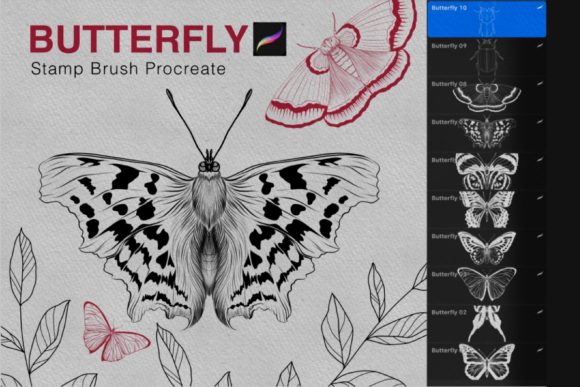
This brush set is not merely a collection of clipart; it is a versatile creative asset designed specifically for the Procreate ecosystem. With eight distinct butterfly designs and two complementary bug stamps, the set provides enough variety to create dynamic scenes without feeling repetitive. For professionals and hobbyists alike, understanding how to leverage these assets can transform a tedious task into an enjoyable, fluid creative process.
Why Specialized Stamps Enhance Digital Workflow
In professional design, consistency and speed are paramount. When working on large-scale projects such as wallpaper patterns, fabric prints, or social media content batches, drawing every individual element manually is rarely practical. The Butterfly Procreate Stamps Brush addresses this by providing vector-like precision in a raster environment. Because these stamps are optimized for the Procreate app, they retain clarity and respond naturally to your input settings.
The primary advantage of using a dedicated stamp brush over standard image pasting is integration. When you use a stamp brush, the elements behave like native brush strokes. This means you can adjust opacity, size, and flow with the same intuitive gestures you use for sketching. Furthermore, because the set includes only eight butterflies and two bugs, it encourages intentional design. You are not overwhelmed by hundreds of nearly identical options; instead, you have a curated selection that works harmoniously together. This curation helps maintain visual consistency across your artwork, ensuring that your final piece looks cohesive rather than cluttered.
Creative Applications Across Industries
The versatility of this brush set extends far beyond simple decoration. Different creative professionals can adapt these tools to meet specific project requirements. Here is how various users can maximize the potential of the Butterfly Procreate Stamps Brush.
Surface Pattern Design
For surface pattern designers, creating seamless repeats is a core skill. Butterflies are a staple motif in textile and home decor industries. Using this brush set, you can quickly block out the placement of your main motifs. Since the brushes are easy to color, you can experiment with different colorways rapidly. Try creating a monochromatic scheme for a sophisticated look, or use vibrant, contrasting colors for a playful children’s fabric. The key is to vary the scale and rotation of the stamps to avoid a rigid, grid-like appearance.
Digital Scrapbooking and Journaling
Digital planners and scrapbookers thrive on unique, hand-drawn elements that stand out from generic stock libraries. The inclusion of two bug stamps alongside the butterflies adds a touch of realism and ecological context. You can use these elements to frame quotes, separate journal entries, or add decorative corners to your pages. Because the brushes work seamlessly with Apple Pencil pressure sensitivity, you can layer them with textured backgrounds to create a tactile, mixed-media feel.
Editorial and Marketing Illustrations
Marketers and bloggers often need eye-catching visuals that convey lightness, transformation, or nature. Butterflies are powerful symbols in branding. Instead of searching for stock photos that may not match your brand colors, you can create custom illustrations in minutes. Use the stamps to create headers for blog posts about spring trends, wellness transformations, or eco-friendly products. The ability to recolor the stamps instantly allows you to align the artwork perfectly with your client’s brand palette.
Techniques for Natural and Dynamic Results
While stamps provide speed, they can sometimes look artificial if used without variation. To keep your artwork engaging and organic, consider these practical techniques.
- Vary Opacity and Flow: Do not leave every stamp at 100% opacity. Lowering the opacity for background elements creates depth and atmosphere. It mimics the way objects appear further away in real life.
- Rotate and Flip: Nature is rarely symmetrical in arrangement. Use the transform tool to rotate your stamps at irregular angles. Flipping the canvas or the individual stamp horizontally can also help break repetition, making the same eight butterflies appear like twenty distinct variations.
- Layering and Masking: Place some butterflies behind text or other elements using layer masks. This integrates the stamps into the composition rather than letting them sit awkwardly on top. It creates a sense of environment and space.
- Custom Coloring: The set is designed to be easy to color. Use the clipping mask feature in Procreate to paint over the stamps without going outside the lines. Experiment with gradients within a single wing to add volume and lighting effects.
Technical Requirements and Setup
To ensure the Butterfly Procreate Stamps Brush functions correctly, your hardware and software must meet specific criteria. This tool is exclusively compatible with the Procreate app, leveraging its unique brush engine capabilities. Before purchasing or downloading, verify that your setup matches the following requirements:
- Device: You need an iPad Pro or a standard iPad model that supports the Procreate app effectively. Older models may experience lag when handling multiple high-resolution layers.
- Input Tool: An Apple Pencil or a third-party stylus that supports pressure sensitivity is required. This ensures that the brush responds to your touch intensity, allowing for nuanced control over stamp placement and opacity.
- Software Version: Ensure your Procreate app is updated to Version 5.0 or higher. Older versions may not support the specific brush file format or the advanced rendering features used in this set.
Keeping your app updated not only ensures compatibility but also provides access to the latest performance improvements and features that can enhance your stamping experience.
Maintaining Originality in Your Work
A common concern among digital artists is the fear that using stamps will make their work look generic. However, originality comes from how you combine and modify elements, not just from drawing every line from scratch. Think of the Butterfly Procreate Stamps Brush as a foundational layer. Once you place your stamps, add hand-drawn details around them. Sketch in flowers, leaves, or abstract shapes that interact with the butterflies. Add texture overlays, noise, or grain to unify the digital elements with a more traditional aesthetic.
Furthermore, consider the context of your composition. A butterfly placed in isolation is just a graphic; a butterfly interacting with light, shadow, and other environmental elements tells a story. Use the stamps as anchors for your narrative, then build the world around them. This approach ensures that even if another artist uses the same brush set, your final artwork will remain distinct and personal.
By integrating these tools thoughtfully, you elevate your digital artistry. The goal is not to replace skill, but to remove friction. The Butterfly Procreate Stamps Brush allows you to bypass the mechanical repetition of drawing wings and bodies, freeing your mental energy for higher-level creative decisions like color theory, composition, and storytelling. Embrace these tools as part of a modern, efficient workflow that respects both your time and your artistic vision.