3D Shapes Procreate Brush Stamps Guide
Drawing a perfect cube in perspective or aligning a complex cylinder can be surprisingly difficult, even for experienced digital artists. What looks like a simple geometric form often requires multiple construction lines, careful vanishing point calculations, and tedious erasing to get right. If you have ever found yourself spending twenty minutes sketching a basic box just to use as a placeholder in a larger composition, you know how much this slows down creative flow. This is where 3D Shapes Procreate Brush Stamps become an invaluable tool in your digital toolkit.
These brush sets are designed to eliminate the friction between having an idea and visualizing it. By providing pre-rendered, perspective-accurate shapes, they allow you to focus on lighting, texture, and composition rather than the mechanical act of drawing straight lines and perfect angles. Whether you are creating technical illustrations, abstract art, or product mockups, these stamps offer a shortcut that maintains professional quality while significantly reducing production time.
Why Geometric Precision Matters in Digital Art
Geometric forms are the building blocks of almost all visual design. From architectural renderings to character design, understanding volume and space is critical. However, the iPad screen, while responsive, lacks the tactile feedback of a ruler or physical drafting tools. This makes freehand geometric drawing inconsistent. For many creators, the priority is not just speed, but reliability. You need shapes that look correct every time you place them.
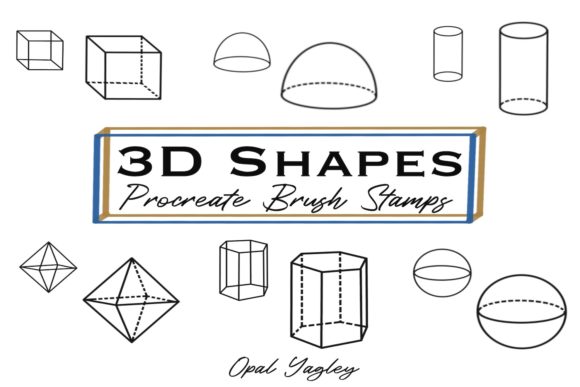
The 3D Geometric Shapes Brush Stamps for Procreate address this by offering two distinct styles: solid forms and dashed outlines. This duality is crucial because different stages of the creative process require different visual aids. Solid shapes are ideal for blocking out masses, checking lighting scenarios, or creating bold, graphic elements. Dashed lines, on the other hand, mimic traditional construction sketches, making them perfect for under-drawings, educational diagrams, or designs that require a technical, blueprint aesthetic.
Tailored Benefits for Different Creators
The value of this toolset shifts depending on who is using it. A freelancer racing against a deadline has different needs than a hobbyist exploring new styles. Understanding how these brushes fit into various workflows can help you decide if they are the right addition to your library.
For Professional Illustrators and Concept Artists
If you work in concept art or industrial design, speed is currency. You often need to iterate through dozens of variations of a product or environment quickly. Using 3D Shapes Procreate Brush Stamps allows you to block out scenes rapidly. Instead of drawing each crate, barrel, or building block from scratch, you can stamp them in, adjust their size, and move on to refining the details. The solid brushes help you visualize weight and volume immediately, while the dash brushes can serve as a guide for more organic detailing later. For professionals, the commercial value lies in the hours saved per project, which directly impacts profitability.
For Educators and Tutorial Creators
Teachers and content creators who explain spatial reasoning, art fundamentals, or mathematics benefit greatly from clear, consistent visuals. When teaching perspective, a shaky hand-drawn cube can confuse students. Pre-made stamps ensure that every example is geometrically accurate. The dashed line style is particularly effective here, as it resembles the step-by-step construction methods taught in classrooms. Educators can use these stamps to create clean, easy-to-read diagrams for slides, worksheets, or video tutorials, enhancing the learning experience without needing advanced 3D modeling software.
For Small Business Owners and Marketers
Entrepreneurs often wear many hats, including that of a graphic designer. If you are creating social media graphics, product packaging concepts, or presentation decks, you may not have the time to master complex 3D software like Blender or Maya. These Procreate brushes offer a middle ground. You can create sophisticated-looking 3D elements directly on your iPad. This flexibility allows small business owners to produce high-quality marketing materials in-house, reducing reliance on external agencies for simple visual assets. The ease of use means you can experiment with layouts and compositions on the fly during client meetings or brainstorming sessions.
For Hobbyists and Beginners
For those new to digital art, the intimidation factor of perspective drawing can be a barrier to entry. Beginners often struggle with proportion and alignment, leading to frustration. Using 3D Geometric Shapes Brush Stamps can serve as both a crutch and a learning tool. By placing pre-made shapes on the canvas, beginners can study how light interacts with forms or practice tracing over the dashed lines to understand muscle memory for specific angles. It lowers the barrier to creating satisfying, polished-looking artwork early in the learning journey, which helps maintain motivation.
Understanding the Included Assets
This specific collection is curated to cover the most common needs without overwhelming the user with unnecessary complexity. It includes 28 shape stamps in total, divided evenly between two functional categories.
- 14 Solid Shape Stamps: These are fully rendered forms with defined edges. They are best used for final compositions, bold graphic design elements, or when you need to obscure background layers. They provide immediate visual weight and presence.
- 14 Dashed Shape Stamps: These feature broken lines, simulating a sketch or technical drawing. They are ideal for under-sketches, annotations, or designs that require a lighter, more transparent feel. They allow you to see underlying layers, making them perfect for construction phases.
The files are delivered as two separate Procreate brush sets: 3D_Shape_Solid.brushset and 3D_Shape_Dashes.brushset. This separation keeps your brush library organized, allowing you to load only what you need for a specific project. Installation is instant and straightforward, requiring no additional software or conversion steps.
Evaluating Fit for Your Workflow
Before integrating any new tool, it is wise to assess whether it aligns with your current workflow. Ask yourself the following questions:
- Do I frequently draw man-made objects? If your art focuses on landscapes, portraits, or organic forms, you may use these less often. However, if you draw interiors, products, or sci-fi elements, these are essential.
- Is speed a priority? If you enjoy the meditative process of drawing every line by hand, these stamps might feel like cheating. But if you are working on commission or tight deadlines, they are a productivity booster.
- Do I need consistency? If you are creating a series of illustrations or a brand identity that requires uniform geometric elements, manual drawing can lead to slight variations. Stamps ensure every cube or sphere is identical in structure.
It is also worth noting the limitations. These are 2D stamps, meaning they are flat images placed on your canvas. They do not rotate in 3D space like a model in a 3D program. You must choose the angle that best fits your perspective from the available options. For most illustrative purposes, this is sufficient, but for hyper-realistic, multi-angle product renders, dedicated 3D software may still be required.
Complementary Tools for Complete Design
While 3D forms add volume and depth, many projects also require flat, two-dimensional elements. If you find yourself needing circles, squares, or triangles for UI design, icons, or flat patterns, you might consider expanding your toolkit. Many creators who purchase the 3D set also benefit from having a 2D Shape Stamp Set available. Having both allows you to seamlessly transition between flat design elements and volumetric illustrations within the same app, maintaining a cohesive workflow without switching between different programs.
Ultimately, 3D Shapes Procreate Brush Stamps are about removing technical barriers so you can focus on creativity. They are a practical investment for anyone looking to streamline their digital art process, whether for professional gain, educational clarity, or personal enjoyment. By saving time on the basics, you free up mental energy for the aspects of art that truly require your unique touch.