Abstract Boho Rainbow Procreate Stamps: A Practical Guide for Digital Artists
Digital illustration has evolved significantly with the advent of powerful mobile applications like Procreate. For artists seeking to streamline their workflow while maintaining a distinct aesthetic, specialized tools such as Abstract Boho Rainbow Procreate Stamps offer a compelling solution. This digital asset pack is designed to integrate seamlessly into the creative process, providing pre-made elements that save time and ensure visual consistency. Understanding the specific contents, installation requirements, and practical applications of these stamps is essential for determining whether they align with your artistic goals.
Understanding the Asset Package
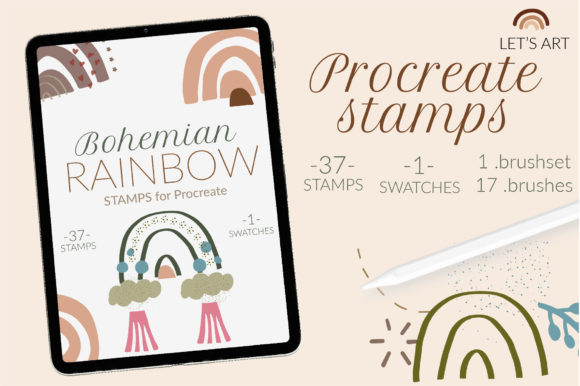
The core of this product is a curated collection of digital brushes and color resources tailored for the bohemian design style. Specifically, the package includes 37 .brush files featuring various rainbow motifs and decorative elements. These are not merely static images but functional brushes that can be stamped onto your canvas, allowing for flexible positioning and scaling. In addition to the brushes, the package contains one .swatches file, which provides a coordinated bohemian color palette. This inclusion is significant because it ensures that the colors used in your illustrations harmonize with the stamp designs, reducing the time spent on color theory adjustments.
It is crucial to note the technical format of these files. The package does not include .brushset files. Instead, users receive individual .brush files. This distinction is vital for compatibility, particularly for users operating on older hardware or software versions. While newer versions of Procreate support bundled brush sets, the individual file format ensures broader accessibility, albeit with a slightly different installation process.
Why Consider Bohemian Rainbow Stamps?
Artists often turn to stamp brushes to overcome creative blocks or to accelerate production timelines. The bohemian aesthetic, characterized by organic shapes, earthy tones, and whimsical elements like rainbows, remains popular in various design sectors, including greeting cards, social media graphics, and print-on-demand products. Using Bohemian rainbow stamps allows creators to incorporate these trending visuals without drawing each element from scratch.
The primary benefit lies in efficiency. Drawing complex rainbow arcs or intricate boho decor repeatedly can be tedious. With these stamps, an artist can place a perfectly formed element in seconds, adjust its opacity, and change its color using the included swatches. This workflow is particularly advantageous for those creating patterned designs, scrapbooking layouts, or children’s book illustrations where consistency and speed are paramount.
Installation and Technical Considerations
One of the most critical aspects of acquiring digital brushes is understanding the installation process. Since this package uses individual .brush files rather than a consolidated .brushset, the installation method differs slightly from standard procedures. This approach is specifically designed to accommodate users with older iPads or those running Procreate version 4.0 or earlier, where brushset functionality may be limited or unavailable.
There are two primary methods for installing these brushes, depending on your preference and device setup:
Method 1: Direct Import via Share Menu
- Download the folder containing the .brush files to a accessible location on your iPad.
- Open the folder and locate the specific .brush files you wish to install.
- Tap and hold the file using your finger or Apple Pencil to bring up the context menu.
- Select Share from the options provided.
- If "Open in Procreate" is not immediately visible, scroll through the app list and select More.
- Find and click on Open in Procreate. The brush will automatically import into your current brush library.
Method 2: Manual Import Within Procreate
- Open the Procreate application and navigate to the Brush Library.
- Create a new collection by tapping the plus sign (+) or selecting an existing folder where you want to store these stamps.
- Tap on the newly created collection or the top bar to access the import option.
- Select Import and navigate to the folder on your iPad where the downloaded .brush files are stored.
- Select the desired .brush files to add them directly to your Procreate library.
For optimal organization, it is recommended to rename the brushes after import. You might label them as part of a "NAME collection" to keep your library structured and easy to navigate during future projects.
Evaluating Fit: When to Use These Stamps
This digital tool is a strong fit for illustrators who prioritize a hand-drawn, organic look but need to maintain a consistent output volume. If you are designing wedding invitations, nursery art, or lifestyle blog graphics, the abstract boho style offers a warm, inviting aesthetic that resonates with contemporary trends. The inclusion of the color swatch file further supports this use case, as it removes the guesswork from palette selection.
Furthermore, these stamps are ideal for beginners who may struggle with drawing symmetrical shapes like rainbows. By using a stamp, the technical barrier to entry is lowered, allowing new artists to focus on composition and storytelling rather than line work precision.
Tradeoffs and Alternatives
While convenient, relying on stamp brushes has tradeoffs. The primary limitation is uniformity. If every rainbow in your portfolio looks identical, your work may lack uniqueness. To mitigate this, artists should experiment with rotating, flipping, and recoloring the stamps. Combining multiple stamps and overlaying them with textured brushes can also help create more dynamic, custom-looking results.
Additionally, users must be comfortable with manual file management. Unlike .brushset files that install with a single tap, managing 37 individual files requires more initial setup time. If you frequently update your library or prefer minimal maintenance, this format might feel cumbersome compared to bundled sets available for newer Procreate versions.
Alternatives to consider include creating your own custom brushes from scratch, which offers total control but demands significant time investment. Alternatively, purchasing vector-based boho elements for use in Adobe Illustrator provides scalability for large-format print, though it lacks the tactile, painterly feel of Procreate brushes.
Final Decision-Making Insights
Before purchasing Abstract Boho Rainbow Procreate Stamps, evaluate your current workflow and technical setup. If you are using an older iPad or Procreate version 4.0, this package is specifically optimized for your needs. If you value speed and consistency in creating bohemian-style art, the 37 elements and accompanying color palette provide substantial value. However, if you seek complete originality in every stroke or prefer automated installation processes, you may want to explore other options or invest time in creating custom assets.
Remember that this is a digital instant download with no physical prints included. Ensure you have adequate storage space on your device and a reliable method for transferring files from your purchase platform to your iPad. By understanding these logistical and creative factors, you can make an informed decision that enhances your digital art practice.