Pastel Colors for iPad: Soft Tones for Procreate
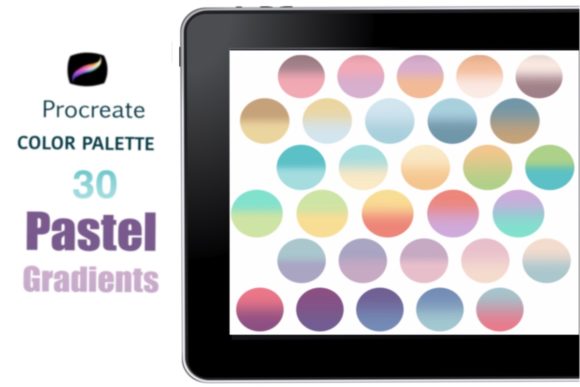
Digital illustration often suffers from a common pitfall: oversaturation. When working on the glowing screen of an iPad, it is tempting to push vibrancy to the maximum, resulting in artwork that feels harsh or visually exhausting. This is where Pastel Colors for iPad becomes an essential tool for modern creators. By shifting your palette toward softer, muted tones, you unlock a level of sophistication and calm that bright primary colors simply cannot achieve. These hues are not just "lighter" versions of standard colors; they are carefully calibrated to provide harmony, depth, and a professional finish to your digital projects.
For artists using the Procreate app, having a curated set of pastels is akin to having a master painter’s pre-mixed oils at your disposal. It removes the guesswork from color theory, allowing you to focus entirely on composition, lighting, and storytelling. Whether you are designing social media graphics, illustrating children’s books, or creating mood boards for interior design clients, this specific color palette offers a versatile foundation that elevates the perceived quality of your work.
Why Pastel Palettes Matter in Digital Design
The psychology of color plays a massive role in how audiences perceive digital content. Pastels evoke feelings of nostalgia, tranquility, and approachability. In a digital landscape cluttered with high-contrast advertisements and neon alerts, soft tones offer a visual breath of fresh air. They invite the viewer to linger rather than scroll past. For marketers and entrepreneurs, this means higher engagement rates on posts that utilize these gentle aesthetics. For educators and bloggers, it creates a learning environment that feels safe and welcoming.
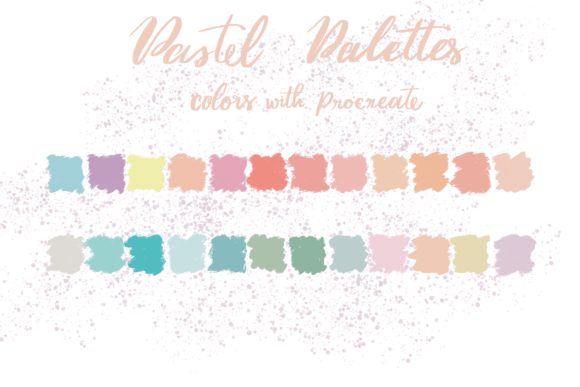
However, working with pastels digitally requires precision. If the values are too close together, your artwork can look washed out or lack definition. The Pastel Colors for iPad swatch file solves this technical challenge by providing a balanced range of tones. It includes enough variation in lightness and saturation to ensure your shadows remain visible and your highlights pop, all while maintaining that signature soft aesthetic. This balance is difficult to achieve manually, especially for those who are still mastering the complexities of digital color wheels.
Unlocking Creative Possibilities with Procreate
The true power of this resource lies in its seamless integration with Procreate. Since these files are exclusively compatible with the Procreate app, they are optimized for the specific way the software handles blending modes, opacity, and layer interactions. To get started, you will need an iPad Pro or a standard iPad paired with an Apple Pencil or a pressure-sensitive stylus. Once imported, the .swatch file sits ready in your library, transforming your workflow instantly.
Illustration and Character Design
Character designers often struggle with skin tones and clothing combinations that feel cohesive. A pastel palette simplifies this process. Imagine designing a whimsical character for a children’s book. Instead of grappling with clashing brights, you can select a soft peach for the skin, a muted mint for the shirt, and a dusty lavender for the background. These colors naturally complement each other because they share similar underlying tones. The result is a character that feels unified and professionally designed, even if you are working quickly under a deadline.
Branding and Social Media Content
For small business owners and freelancers, consistency is key to building a recognizable brand. Pastels are incredibly popular in lifestyle, beauty, and wellness industries because they convey elegance and simplicity. You can use this palette to create Instagram carousels, Pinterest pins, or YouTube thumbnails that stand out through subtlety rather than noise. By sticking to a defined set of pastel hues, your feed becomes visually organized and aesthetically pleasing, encouraging followers to engage with your content more deeply.
Interior Design and Mood Boarding
Interior designers and architects can also benefit significantly from this tool. When presenting concepts to clients, digital mood boards created in Procreate can be far more impactful than static images. Using Pastel Colors for iPad, you can sketch out room layouts, experiment with wall colors, and visualize furniture arrangements in real-time. The soft tones help clients imagine the atmosphere of a space without being distracted by overly aggressive colors. It allows for a collaborative design process where changes can be made on the fly during client meetings.
Practical Tips for Using Pastel Swatches Effectively
While having the right tools is crucial, knowing how to use them determines the success of your project. Here are several practical strategies to ensure your pastel designs remain clear, effective, and engaging.
- Create Contrast with Value: The biggest mistake artists make with pastels is lacking contrast. Since all colors are light, you must rely on value differences. Use the darkest tones in your palette for outlines, shadows, and key focal points. This anchors the image and prevents it from looking flat.
- Layering for Depth: Procreate’s layering capabilities shine with pastels. Try using a multiply layer with a slightly darker pastel shade to add shadow depth without changing the hue drastically. This maintains the soft look while adding three-dimensional form.
- Limit Your Palette: Although the swatch file offers many options, restrict yourself to three or four main colors per piece. This restraint creates a stronger visual identity and prevents the artwork from becoming chaotic. Use the remaining colors sparingly for accents.
- Check Accessibility: Always ensure your text or key elements have enough contrast against the pastel background. If you are designing for web or mobile, use a contrast checker tool to verify readability. Soft backgrounds should never compromise legibility.
Adapting the Palette for Different Audiences
One of the strengths of Pastel Colors for iPad is its adaptability. Different demographics respond to color in unique ways, and this palette can be tweaked to suit various targets.
For a younger audience, such as teenagers or young adults, lean into the brighter end of the pastel spectrum—think bubblegum pinks and sky blues. These tones feel energetic and trendy. For a more mature or corporate audience, shift toward the muted, grayish pastels like sage green, slate blue, or taupe. These colors communicate reliability and sophistication. By understanding your target audience, you can select specific subsets from the swatch file to align with their preferences and expectations.
Educators can use these colors to create calming visual aids for students with sensory processing sensitivities. The low-saturation environment reduces cognitive load, making it easier for learners to focus on the information presented. Similarly, therapists and counselors might use these tones in digital journals or relaxation apps to promote a sense of peace and mental clarity.
Maintaining Originality and Consistency
A common concern when using pre-made palettes is the fear of producing generic work. However, color is only one component of your artistic voice. Your line work, brush choices, composition, and subject matter are what truly define your style. The Pastel Colors for iPad swatch is merely a starting point. To keep your results original, experiment with different brushes within Procreate. Combine the pastel colors with textured brushes, watercolor effects, or grain overlays to add tactile quality to your digital pieces.
Consistency comes from repetition. Make this palette your go-to resource for a specific project series. Over time, your audience will associate these specific hues with your brand or artistic identity. This recognition builds trust and loyalty. Whether you are a hobbyist exploring new styles or a professional designer managing multiple client accounts, having a reliable, high-quality color foundation allows you to produce work faster and with greater confidence.
In conclusion, integrating Pastel Colors for iPad into your Procreate workflow is a strategic move for any creator looking to refine their aesthetic. It offers a practical solution to color selection, ensuring harmony and professionalism in every stroke. By understanding the psychological impact of soft tones and applying practical design principles, you can create unique, compelling visuals that resonate with your audience. The tools are there; the .swatch file is ready. All that remains is for you to pick up your Apple Pencil and start creating.