Mastering the Procreate Outline Brush
Digital illustration has evolved from a niche hobby into a primary workflow for designers, illustrators, and content creators worldwide. At the heart of this shift is the ability to combine traditional artistic intuition with digital precision. One tool that bridges this gap effectively is the Procreate Outline Brush. Whether you are crafting intricate hand-lettering pieces, designing bold logos, or adding definition to character art, having a reliable set of outline tools can transform your workflow from tedious to intuitive.
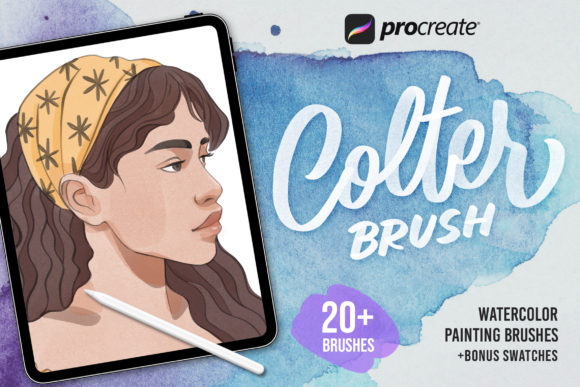
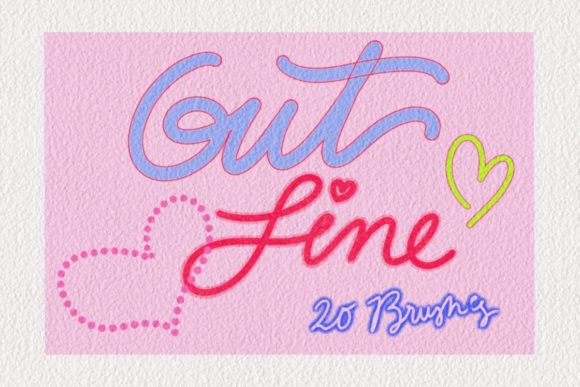
This article explores the creative potential of a specialized brush set featuring 20 distinct outline brushes and one unique glitter accent brush. Designed exclusively for the Procreate ecosystem, these tools offer a streamlined approach to achieving clean, professional-grade lines without the frustration of unstable strokes or inconsistent pressure sensitivity.
Why Precision Matters in Digital Art
In traditional media, an outline is often the skeleton of a piece. It defines shape, separates color fields, and guides the viewer’s eye. In digital art, particularly on tablets, achieving that same level of control can be challenging. Native brushes sometimes lack the specific weight or texture needed for crisp linework, leading artists to spend excessive time smoothing edges or correcting wobbles.
A dedicated Procreate Outline Brush solves this by providing pre-calibrated stability and texture. The 20-brush set discussed here is engineered to respond naturally to the Apple Pencil, ensuring that every stroke feels intentional. For professionals who need to deliver high-quality assets quickly, this reliability is not just a convenience; it is a necessity. It allows you to focus on composition and style rather than fighting against the software.
Exploring the 20-Brush Variety Pack
Not all outlines serve the same purpose. A comic book artist needs sharp, uniform lines, while a watercolor illustrator might prefer softer, textured edges that mimic natural media. This collection addresses that diversity by offering twenty variations tailored to different aesthetic needs.
- Clean Vector-Style Lines: Ideal for logo design, iconography, and modern graphic illustrations where clarity is paramount.
- Textured Sketch Lines: These brushes introduce subtle grain, perfect for concept art, storyboarding, or maintaining a hand-drawn feel in finished pieces.
- Variable Weight Strokes: Essential for calligraphy and dynamic lettering, these brushes react sensitively to pressure, creating thick downstrokes and thin upstrokes effortlessly.
- Rough Edge Definitions: Great for organic subjects like foliage, fur, or distressed textures, adding depth without manual detailing.
By having this variety at your fingertips, you can switch between styles within a single project. Imagine creating a poster where the main title uses a bold, clean outline for impact, while the background elements feature softer, textured lines to create depth. This versatility prevents your work from looking flat or one-dimensional.
The Power of Hand-Lettering and Typography
Hand lettering is one of the most popular applications for digital brushes. Brands, bloggers, and social media managers constantly seek unique typographic elements that stand out in a crowded digital landscape. The beautiful hand-lettering brush included in this set is designed specifically for this purpose.
When creating custom typography, consistency is key. A good lettering brush maintains a smooth flow, allowing you to connect letters seamlessly. With this tool, you can draft complex scripts, bold sans-serifs, or playful display fonts with confidence. The pressure sensitivity ensures that your flourishes look elegant rather than forced.
For marketers and small business owners, this means you can create branded quotes, social media headers, or product labels in-house without hiring a external typographer. The learning curve is minimal, but the professional result is immediate. You can experiment with different weights and styles until the text perfectly matches your brand’s voice.
Adding Sparkle: The Glitter Brush Accent
While outlines provide structure, accents provide personality. The inclusion of a single, high-quality glitter brush might seem like a small addition, but it offers significant creative value. Glitter and sparkle effects are notoriously difficult to paint manually because they require complex layering and blending to look realistic.
This glitter brush simplifies the process. It can be used to highlight specific parts of your lettering, add magic to fantasy illustrations, or create eye-catching details in greeting card designs. Because it is optimized for Procreate, it renders efficiently without slowing down your device, even on larger canvases.
Consider using the glitter brush sparingly. A subtle shimmer on the crossbar of a title font can draw attention without overwhelming the design. In children’s book illustrations, it can bring magical elements to life. The key is balance; let the outline brushes do the heavy lifting of structure, and use the glitter brush for those final, delightful touches.
Technical Requirements and Setup
To ensure optimal performance, it is important to note that this brush set is exclusive to the Procreate app. It will not function in other drawing applications. Before purchasing or downloading, verify that your hardware and software meet the following requirements:
- Device: iPad Pro or standard iPad models compatible with Apple Pencil.
- Input: Apple Pencil (1st or 2nd generation) for full pressure and tilt sensitivity.
- Software: Procreate Version 5.0 or higher.
Using an older version of Procreate may result in missing features or incorrect brush behavior, as newer updates often refine brush engine capabilities. Ensuring your app is up to date guarantees that the 20 outline brushes and the glitter brush perform exactly as intended.
Practical Applications for Different Creators
How you use these brushes depends on your professional goals. Here is how different users can adapt this toolkit:
For Freelance Designers and Illustrators
Speed is currency. Use the clean outline brushes for client logos and vector-style illustrations. The consistency reduces revision time, allowing you to take on more projects. Use the textured brushes for editorial illustrations where a human touch is preferred over sterile digital perfection.
For Educators and Content Creators
Visual aids engage students and followers. Use the hand-lettering brush to create clear, attractive headings for worksheets, presentation slides, or YouTube thumbnails. The glitter brush can highlight key information or add visual interest to educational graphics, making complex topics more approachable.
For Hobbyists and Journalers
Digital planning and journaling have surged in popularity. These brushes allow you to create customized headers, dividers, and decorative elements for your digital planners. The variety ensures your journals never look repetitive, keeping the creative process fresh and enjoyable.
Maintaining Consistency and Quality
Having great tools is only half the battle. To keep your results professional, consider these best practices:
- Organize Your Layers: Keep your outline layers separate from color layers. This allows you to adjust line weight or color without affecting the fill, giving you greater flexibility during edits.
- Use StreamLine: While these brushes are stable, enabling Procreate’s StreamLine feature can further smooth out long, sweeping strokes, especially in lettering.
- Experiment with Opacity: Don’t always stick to 100% opacity. Lowering the opacity of your outline brush can create softer, more integrated looks, particularly when pairing with watercolor or pastel textures.
- Save Custom Palettes: Save your favorite outline colors alongside your brush presets. This reduces decision fatigue and helps maintain brand consistency across multiple projects.
Ultimately, the Procreate Outline Brush set is more than just a collection of digital tools; it is an invitation to refine your craft. By reducing technical friction, it allows your creativity to flow unimpeded. Whether you are designing a new brand identity, illustrating a children’s book, or simply exploring the joy of digital lettering, these brushes provide the foundation you need to create work that is both beautiful and effective.
Embrace the versatility of the 20-outline variety and the charm of the glitter accent. With the right setup and a clear vision, your iPad becomes a powerful studio capable of producing professional-grade art anywhere, anytime.