Mastering the Cursi Chalk Brush in Procreate
Digital art often struggles to replicate the tactile satisfaction of traditional media. The friction of graphite on paper, the drag of charcoal, or the dusty resistance of pastel chalk are sensations that define the artistic experience for many. This is where the Procreate Brush - Cursi Chalk Brush steps in, bridging the gap between screen and surface. It is not merely a tool; it is a simulation of texture that responds to pressure and tilt with remarkable fidelity. For artists who miss the organic imperfections of physical media, this brush offers a compelling alternative that feels less like drawing on glass and more like creating on a textured board.
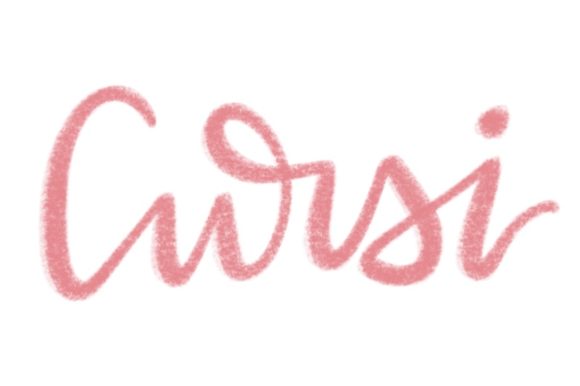
The appeal of the Cursi Chalk brush lies in its awesome chalk texture. Unlike standard digital brushes that can feel slippery or overly uniform, this tool introduces a granular quality to every stroke. It captures the subtle variations in opacity and density that occur when real chalk catches on the peaks and valleys of paper. This level of detail matters differently depending on who is holding the stylus. A professional illustrator might value it for its ability to speed up shading workflows, while a hobbyist might appreciate the immediate, forgiving nature of the medium. Understanding how this specific tool fits into various creative workflows can help you decide if it belongs in your digital toolkit.
Why Texture Matters in Digital Illustration
In the world of digital design, perfection is often the default. Lines are smooth, colors are flat, and gradients are seamless. While this has its place, it can sometimes result in work that feels sterile or disconnected from human touch. The Procreate Brush - Cursi Chalk Brush reintroduces humanity into the process. The awesome chalk texture provides visual noise and organic variation that engages the viewer’s eye. It suggests hand-made effort, which can evoke warmth and nostalgia.
For marketers and bloggers, this aesthetic is particularly valuable. Content that feels authentic often performs better than content that looks mass-produced. Using a chalk-style brush for social media graphics, quote cards, or blog headers can make a brand appear more approachable and grounded. It signals that there is a person behind the business, not just an algorithm. The roughness of the chalk edge breaks the monotony of pixel-perfect designs, drawing attention to key messages without relying on loud colors or complex animations.
Perspectives from Different Creative Roles
The utility of the Cursi Chalk brush shifts depending on your primary goals. Here is how different users might evaluate and utilize this tool.
For Beginners and Hobbyists
If you are new to Procreate, the learning curve can feel steep. You must master layer management, blending modes, and brush settings simultaneously. The Procreate Brush - Cursi Chalk Brush is an excellent starting point because it is forgiving. Chalk, by nature, is soft and blendable. Mistakes are easily covered or smoothed out. Beginners often struggle with confidence, fearing that one wrong line will ruin a piece. With this brush, errors can be integrated into the texture or gently erased without leaving harsh digital artifacts. It allows new artists to focus on form and composition rather than technical precision.
- Ease of Use: Requires minimal setting adjustments to look good.
- Learning Value: Teaches pressure control and layering naturally.
- Cost Efficiency: Reduces the need for multiple complex brushes during early stages.
For Professional Illustrators and Concept Artists
Experienced artists often seek tools that offer speed and flexibility. The awesome chalk texture of the Cursi Chalk brush allows for rapid blocking-in of shapes and values. In concept art, the goal is often to communicate an idea quickly rather than to render a finished product. This brush excels at establishing mood and lighting through broad, textured strokes. Professionals may also use it for final renders, particularly in styles that mimic storybook illustrations or editorial sketches. The ability to switch between sharp lines and soft shading by adjusting tilt and pressure enhances workflow efficiency.
Moreover, professionals value reliability. A brush that behaves predictably under different pressure levels is crucial for meeting deadlines. The Procreate Brush - Cursi Chalk Brush maintains consistency, ensuring that the texture does not become muddy or pixelated even when scaled up for print purposes.
For Educators and Coaches
Teachers and online course creators frequently need to annotate images, create diagrams, or write notes on digital whiteboards. Standard pens can look too rigid or clinical. Using a chalk-style brush adds a pedagogical warmth that mimics the classroom blackboard experience. This familiarity can help students feel more comfortable and engaged. When explaining complex concepts, the organic feel of the Cursi Chalk brush can make instructions feel less like a lecture and more like a collaborative discussion.
- Create engaging slide decks with hand-drawn elements.
- Annotate student submissions with a personal, encouraging touch.
- Design worksheets that feel approachable rather than intimidating.
For Small Business Owners and Entrepreneurs
Entrepreneurs often wear many hats, including graphic designer. Time is a scarce resource. The Procreate Brush - Cursi Chalk Brush offers a quick way to create unique visual assets without needing advanced design software skills. Whether designing a menu, a logo sketch, or packaging concepts, the chalk texture adds a boutique, artisanal feel. This is particularly effective for businesses in the food, wellness, or handmade goods sectors, where authenticity is a key selling point.
Consider a coffee shop owner creating daily specials for Instagram. A quick sketch of a latte cup using the Cursi Chalk brush feels more inviting than a stock photo. It communicates freshness and care. For these users, the priority is not artistic mastery but effective communication and brand alignment. The brush serves as a bridge between professional polish and personal touch.
Evaluating Quality and Flexibility
When assessing any digital tool, consider its long-term usefulness. Does it serve a single niche, or can it adapt? The Cursi Chalk brush demonstrates significant flexibility. It is not limited to sketching. By adjusting opacity and flow, it can be used for subtle texturing, background washes, or highlighting. Its awesome chalk texture remains consistent across different canvas sizes, which is a testament to its high-quality engineering.
Flexibility also extends to style. While it mimics traditional chalk, it can be combined with other digital techniques. You might use it for initial sketches and then overlay vector lines for clarity. Or, you could use it to add texture to a flat color illustration, giving it depth. This adaptability ensures that the brush remains relevant as your skills evolve. It grows with you, from simple doodles to complex commercial projects.
Making the Right Choice for Your Workflow
Deciding whether to incorporate the Procreate Brush - Cursi Chalk Brush into your routine depends on your specific needs. Ask yourself what you value most in your creative process. If you prioritize speed and organic aesthetics, this brush is likely a strong fit. If you require hyper-realistic precision or clean, corporate lines, it may serve better as a supplementary tool for texture rather than a primary instrument.
Ultimately, the best tool is the one that removes friction between your idea and its execution. For many, the tactile response and visual richness of the Cursi Chalk brush achieve exactly that. It invites experimentation and reduces the fear of the blank canvas. Whether you are a marketer looking to humanize your brand, an educator aiming to engage students, or an artist seeking the feel of traditional media, this brush offers a versatile and reliable solution. Explore its capabilities, test its limits, and see how its awesome chalk texture can enhance your unique creative voice.