Liquid Shadow Procreate Lettering Brush Guide
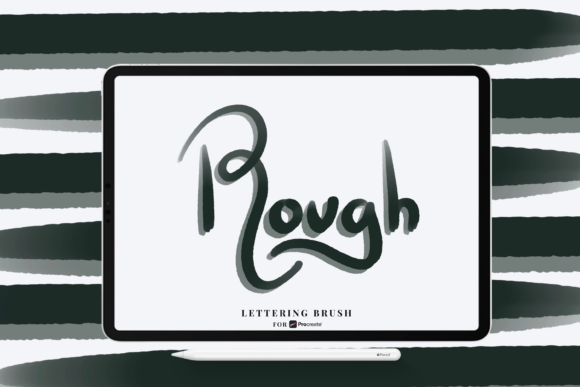
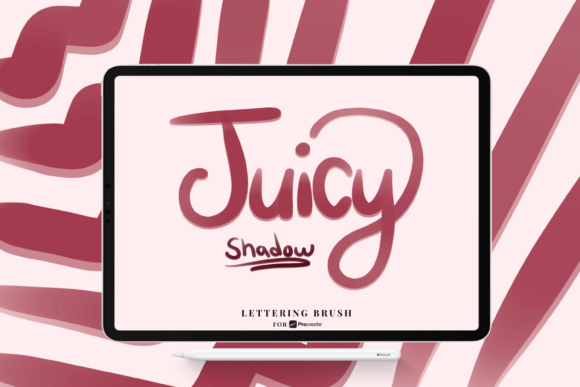
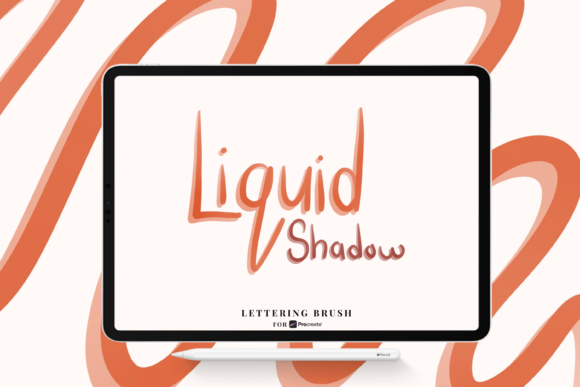
In the evolving landscape of digital illustration, the difference between a flat design and a compelling visual often lies in the subtle details. For lettering artists, graphic designers, and content creators, achieving depth without cluttering the composition is a constant challenge. The Liquid Shadow Procreate Lettering Brush emerges as a specialized tool designed to address this specific need, offering a streamlined workflow for adding dimensional weight to typography and illustrations. Unlike generic shadow tools that require manual layer manipulation or complex blur settings, this brush integrates the physics of light and opacity directly into the stroke mechanics.
This article explores how this specific digital asset functions, who benefits most from its unique capabilities, and how it can enhance your creative process within the Procreate ecosystem. By understanding the technical nuances of pressure-sensitive opacity and size variation, you can determine if this tool aligns with your artistic goals and workflow requirements.
Understanding the Mechanics of Digital Depth
To appreciate the value of the Liquid Shadow brush for Procreate, it is essential to understand how digital shadows typically function. Traditionally, creating a soft, realistic shadow involves duplicating a layer, changing its blend mode, applying a Gaussian blur, and manually adjusting opacity. While effective, this method is static. If you change the lettering, you must rebuild the shadow. The Liquid Shadow approach differs by making the shadow an intrinsic part of the drawing experience.
The core functionality relies on the advanced capabilities of the Apple Pencil. The brush is engineered to respond dynamically to two key inputs: pressure and tilt. When you press harder, the shadow becomes denser and potentially larger, mimicking the way an object closer to a surface casts a sharper, darker shadow. When you lighten your touch, the shadow fades, creating a sense of distance or ambient light. This Apple Pencil pressure sensitivity for opacity and size allows for organic, hand-drawn variations that are difficult to replicate with automated filters.
For professionals, this means less time spent in post-production editing. The immediate visual feedback allows for real-time adjustments to lighting and depth, ensuring that the typography feels grounded within the canvas rather than floating above it. This integration of form and shadow supports a more intuitive creative flow, where the artist focuses on composition and style rather than technical workaround.
Practical Applications for Creators and Marketers
The utility of the Liquid Shadow Procreate Lettering Brush extends beyond pure artistic expression. In today’s digital-first economy, visual communication is paramount for marketers, bloggers, and small business owners. Social media graphics, ebook covers, and promotional banners require eye-catching typography that stands out in crowded feeds. A well-executed shadow effect adds hierarchy and readability, guiding the viewer’s eye to the most important information.
Consider a freelance graphic designer working on a logo concept for a local coffee shop. Using standard brushes, they might spend twenty minutes refining the drop shadow to ensure it looks natural on various backgrounds. With the Liquid Shadow brush, the shadow is applied during the initial sketching phase. The designer can experiment with different angles and intensities instantly, presenting multiple viable options to the client in half the time. This efficiency translates directly to better project margins and faster turnaround times.
Similarly, educators and course creators who produce digital worksheets or presentation slides can use this tool to create engaging headers. The "liquid" aspect of the brush suggests a smooth, flowing aesthetic that works particularly well for lifestyle, wellness, and creative industries. It avoids the harsh, geometric look of standard drop shadows, offering a softer, more approachable vibe that resonates with modern design trends.
Technical Compatibility and File Format
Before integrating any new tool into your workflow, understanding its technical constraints is crucial. The Liquid Shadow brush for Procreate is distributed in the .brush format. This is a proprietary file type specifically designed for the Procreate application on iPad. It is not compatible with Adobe Photoshop, Illustrator, or other desktop-based design software. Users must have an iPad with Procreate installed to utilize this asset.
Furthermore, the brush’s performance is tied to the hardware capabilities of the Apple Pencil. The nuanced control over opacity and size requires the precise pressure sensors found in the Apple Pencil (both first and second generations). While it may function with third-party styluses, the full benefit of the pressure-sensitive dynamics may be limited or inconsistent. For professionals relying on pixel-perfect precision, using the official Apple Pencil is recommended to ensure the brush behaves as intended.
When you purchase or download this tool, you will receive the single Liquid Shadow Brush .brush file. Installation is straightforward: users simply tap the file on their iPad, and it automatically imports into their Procreate brush library. This simplicity reduces friction, allowing creators to start experimenting immediately without navigating complex installation procedures or plugin managers.
Who Benefits Most from This Tool?
While any digital artist can benefit from expanded brush libraries, certain groups will find the Liquid Shadow Procreate Lettering Brush particularly valuable:
- Hand-Lettering Artists: Those who specialize in calligraphy and custom typography can add depth to their work without breaking their stroke flow. The brush supports the natural rhythm of lettering, enhancing legibility and aesthetic appeal.
- Social Media Managers: Individuals responsible for daily content creation need speed and consistency. This brush allows for quick generation of polished text graphics that look professional without requiring extensive design training.
- Digital Journalers and Hobbyists: For those using Procreate for personal creativity, the brush adds a layer of sophistication to daily logs, sketches, and doodles, making personal projects feel more finished and shareable.
- Small Business Owners: Entrepreneurs who handle their own branding can create cohesive visual assets for packaging, labels, and online stores, maintaining a high-quality look without hiring external designers for every minor update.
Limitations and Considerations
No tool is a universal solution. It is important to recognize situations where the Liquid Shadow brush for Procreate may not be the ideal choice. Because the shadow is generated dynamically based on pressure, it offers less control over uniform, geometric consistency compared to vector-based drop shadows in Illustrator. If a project requires mathematically perfect, identical shadows across hundreds of elements, a traditional layer-style approach might be more efficient.
Additionally, the "liquid" aesthetic implies a certain organic quality. For designs requiring sharp, corporate, or industrial rigidity, the soft edges produced by this brush might need additional refinement or masking. Users should also be mindful of layer complexity. While the brush simplifies the creation process, overusing heavy shadows can muddy a composition. Best practices involve using shadows sparingly to highlight key elements rather than applying them uniformly to all text.
Finally, since this is a digital brush, it does not replace fundamental design principles. Understanding light sources, color theory, and contrast remains essential. The brush is a facilitator, not a substitute for design knowledge. Users should continue to study how light interacts with forms to use the tool effectively.
Enhancing Your Creative Workflow
Integrating the Liquid Shadow Procreate Lettering Brush into your toolkit is about more than adding a visual effect; it is about optimizing your creative process. By reducing the steps required to achieve professional-grade depth, you free up mental energy for higher-level creative decisions. Whether you are drafting a quick sketch or finalizing a client deliverable, the ability to manipulate opacity and size through natural hand movements creates a more connected and satisfying drawing experience.
For those looking to elevate their digital lettering game, this brush offers a practical, efficient, and aesthetically pleasing solution. It bridges the gap between traditional artistic intuition and digital precision, allowing creators to produce work that is both visually striking and professionally polished. As with any new tool, experimentation is key. Spend time adjusting your pressure sensitivity settings in Procreate to match your personal drawing style, and observe how the shadow responds to different speeds and angles. Over time, this brush can become an indispensable part of your digital arsenal, supporting your goals for efficiency, creativity, and visual impact.