Craft Paper Procreate Brushset Guide
Digital art often struggles to capture the tactile warmth of traditional media. Screens are smooth, backlit, and uniform, which can sometimes make illustrations feel sterile or detached from the physical world. This is where the Craft Paper Procreate Brushset bridges the gap. By introducing authentic texture and grain into your digital workflow, this tool allows artists to recreate the organic imperfections that make hand-crafted work so compelling. It is not just about adding a filter; it is about integrating the substrate into the creative process itself.
For creators ranging from freelance illustrators to small business owners designing packaging, understanding how to leverage texture can elevate a project from good to memorable. This brush set offers a practical solution for those who want the convenience of digital editing with the aesthetic depth of paper, canvas, or cardstock.
Understanding the Toolset
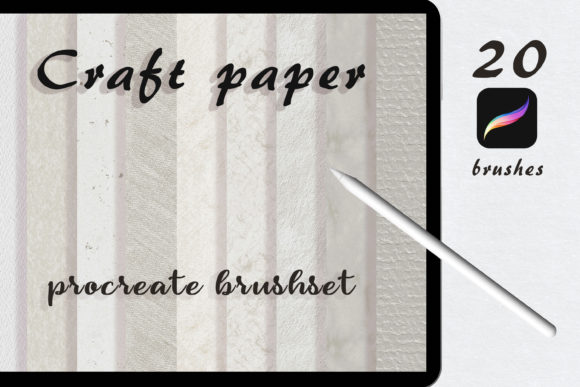
The Craft Paper Procreate Brushset contains 20 high-quality brushes designed specifically for the Procreate environment. These are not generic overlays but dynamic tools that interact with your stylus pressure and tilt. The primary appeal lies in their realism. Each brush mimics the way pigment sits on textured surfaces, allowing for a level of control that static images cannot provide.
To get the most out of these tools, it is essential to understand the technical requirements. This set requires the latest version of the Procreate app, specifically Procreate 5, installed on your iPad. It is important to note that this set will not work with previous versions of the app, nor is it compatible with other software like Photoshop or Illustrator. This exclusivity ensures that the brushes are optimized for Procreate’s specific rendering engine, providing a seamless experience for iPad users.
Techniques for Realistic Integration
Using texture brushes effectively requires more than just selecting a tool and drawing. The magic happens in how you layer and blend your work. A common mistake beginners make is painting directly onto a white canvas and expecting the texture to appear magically. Instead, the process should be intentional.
Start by choosing a contrasting background. If you are aiming for a watercolor look, select a dark or mid-tone base. When you paint over this with your favorite paper brush from the set, the texture interacts with the underlying color, creating depth. You can then enjoy and play using Blending modes to blend your art into the paper. Modes like "Multiply," "Overlay," or "Soft Light" can dramatically change how the texture interacts with your colors, allowing you to simulate everything from rough sketching paper to fine art canvas.
Another effective approach is to turn the paper background as a base to your artwork. This is particularly useful for watercolor or oil styles. By establishing the texture first, every stroke you add inherits that grain. This creates a cohesive look where the medium and the message feel unified. For oil-style paintings, this technique helps break up the digital smoothness, giving the illusion of thick impasto strokes catching light unevenly across a woven surface.
Creative Applications Across Industries
The versatility of the Craft Paper Procreate Brushset means it serves various professional needs beyond simple illustration. Here is how different creators can adapt these tools for their specific goals.
Branding and Marketing Materials
For marketers and small business owners, authenticity is a powerful currency. Digital ads often suffer from "banner blindness" because they look too polished. Using craft paper textures in social media graphics or email headers can stop the scroll. A skincare brand might use a soft, fibrous paper texture to convey natural ingredients, while a coffee shop could use a rougher, kraft-paper style to emphasize artisanal quality. The key is consistency; choose one or two brushes from the set and stick with them across your campaign to build a recognizable visual identity.
Educational Content and E-Books
Educators and publishers can use these brushes to make digital learning materials feel more approachable. Textbooks and worksheets often feel intimidating when they are stark black and white. Adding a subtle paper texture to backgrounds or using textured brushes for diagrams can make content feel warmer and more inviting. For children’s books, the ability to mimic traditional media allows illustrators to create whimsical, storybook aesthetics without the mess of physical paints. This is especially valuable for self-publishers who need high-quality visuals without the cost of traditional printing proofs.
Freelance Illustration and Concept Art
Freelancers often need to pivot between styles quickly. One client may want a clean vector look, while another desires a gritty, hand-drawn feel. Having a reliable set of paper brushes allows illustrators to switch gears efficiently. For concept artists, these brushes are invaluable for rapid ideation. Sketching over a textured background can help visualize how a final piece might look in print, allowing for better communication with clients who may not understand digital mockups.
Best Practices for Consistent Results
To ensure your work remains professional and audience-friendly, consider these practical recommendations when using the Craft Paper Procreate Brushset.
- Maintain Contrast: Always ensure there is enough contrast between your brush strokes and the background texture. If the texture is too dominant, it can distract from the subject matter. Adjust the opacity of your texture layer if necessary.
- Layer Organization: Keep your texture layers separate from your color layers. This non-destructive workflow allows you to tweak the blending mode or opacity later without repainting your entire piece.
- Color Harmony: Textures can shift the perceived color of your paints. A warm paper tone will warm up cool blues and greens. Test your palette on a small section before committing to the full illustration.
- Resolution Matters: Since these brushes are high quality, ensure your canvas resolution is sufficient for your intended output. Low-resolution canvases can pixelate the fine details of the paper grain, reducing the realistic effect.
Exploring Style Variations
While watercolor and oil styles are prominent uses, do not limit yourself to traditional media simulations. The 20 brushes in this set can be adapted for modern graphic design trends. Try using them for typography, giving letters a stamped or hand-printed appearance. Experiment with abstract backgrounds for website headers or podcast cover art. The irregular edges and grain can add a human touch to geometric designs, softening the overall composition.
You can also combine these brushes with other Procreate features. Use the liquify tool to distort textured elements for a surreal effect, or apply animation assist to create subtle movement in the texture, simulating wind blowing through paper or water rippling across a surface. The only limit is your willingness to experiment with the tools at your disposal.
Final Thoughts on Digital Texture
Incorporating the Craft Paper Procreate Brushset into your workflow is an investment in the emotional resonance of your art. It reminds viewers that behind the screen, there is a human creator making deliberate choices about feel and form. Whether you are designing a logo, illustrating a children’s book, or creating social media content, these brushes offer a straightforward path to adding depth and character.
Remember that technology is merely a vessel for creativity. The brushes provide the capability, but your vision provides the value. By mastering the blending modes, understanding the importance of background contrast, and respecting the technical requirements of Procreate 5, you can unlock a new dimension in your digital artistry. Start experimenting today, and let the texture guide your next masterpiece.