Procreate - Origami Stamps: Elevating Digital Design with Paper-Folded Aesthetics
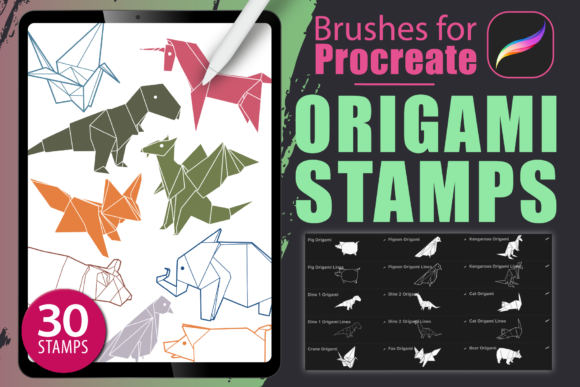
Digital illustration often struggles to capture the tactile warmth of physical media. We spend hours perfecting gradients and textures, yet sometimes what a project truly needs is the crisp, geometric charm of folded paper. This is where Procreate - Origami Stamps changes the game. This specialized collection of thirty brushes transforms your iPad into a studio for creating intricate origami animals, offering a unique blend of traditional craft aesthetics and modern digital efficiency. For designers, illustrators, and hobbyists alike, these tools provide an immediate shortcut to high-quality, stylized assets that would otherwise take hours to construct manually.
Bridging the Gap Between Craft and Canvas
At its core, this brush set is designed for the Procreate app, requiring Version 5.0 or higher to function correctly. The premise is simple yet powerful: instead of drawing every fold and shadow from scratch, you utilize pre-configured stamps that mimic the look of folded paper. These aren't just static images; they are dynamic tools that respond to your input. When paired with an Apple Pencil or any pressure-sensitive stylus on an iPad Pro or standard iPad, the brushes allow for nuanced control over opacity and size, letting you layer elements to create depth and complexity.
The collection includes a diverse range of origami animals, from delicate birds to sturdy bears, each rendered with the sharp angles and clean lines characteristic of paper folding. This specific aesthetic appeals to a wide audience because it feels both nostalgic and contemporary. It strips away the noise of hyper-realism, focusing instead on form and silhouette. For creative professionals, this means having a reliable resource for generating consistent visual elements without sacrificing artistic integrity.
Real-World Applications for Designers and Illustrators
The versatility of Procreate - Origami Stamps extends far beyond casual doodling. In professional settings, time is often the most scarce resource. Consider a graphic designer working on a branding package for a children’s educational startup. The client wants imagery that feels approachable, safe, and creative. Using these origami brushes, the designer can rapidly prototype mascot concepts or icon sets that embody these values. The geometric nature of origami lends itself well to logo design, where simplicity and scalability are paramount.
In the realm of web design, these stamps offer a lightweight alternative to heavy photographic assets. A landing page for a sustainability-focused brand might use origami animals to symbolize nature and care for the environment. Because the style is illustrative rather than photographic, it avoids the cliché stock photo look while maintaining a clean, modern interface. Designers can easily recolor the stamps to match specific brand palettes, ensuring cohesive visual identity across desktop and mobile views.
Print design also benefits significantly from this toolset. Imagine creating a series of greeting cards or party invitations. The tactile illusion of folded paper adds a layer of sophistication and whimsy that resonates with recipients. Whether it’s a baby shower invitation featuring origami elephants or a birthday card with a menagerie of folded creatures, the stamps provide a ready-made library of charming characters. This reduces the turnaround time for custom illustrations, allowing artists to take on more clients or focus on other aspects of the design, such as typography and layout.
Who Benefits Most from This Collection?
Different users will find unique value in Procreate - Origami Stamps, depending on their workflow and goals.
- Freelance Illustrators: For those who need to deliver quick turnarounds, these brushes act as force multipliers. You can build complex scenes by layering multiple stamps, adjusting their rotation and scale to create a sense of movement and interaction between characters.
- Social Media Content Creators: Engaging visuals are currency on platforms like Instagram and Pinterest. Origami-style posts stand out in feeds dominated by photos and flat vectors. Creators can use these stamps to produce thematic content series, such as "Animal of the Week," with minimal effort.
- Educators and Parents: Teachers looking for engaging visual aids for storytelling or classroom decorations can use these tools to create custom materials. The friendly, non-threatening appearance of origami animals makes them ideal for young audiences.
- Hobbyists and Journalers: Digital journaling has surged in popularity. Users of GoodNotes or Procreate for planning can incorporate these stamps to add personality to their daily logs without needing advanced drawing skills.
Practical Considerations Before You Start
While the ease of use is a major selling point, getting the best results from Procreate - Origami Stamps requires understanding a few technical nuances. First, ensure your hardware meets the requirements. An iPad Pro offers the best experience due to its processing power and screen responsiveness, but any iPad compatible with Procreate 5.0+ will work. The critical component is your stylus. Pressure sensitivity is key to controlling the stamp's appearance. Without an Apple Pencil or a comparable active stylus, you lose the ability to vary the intensity and size dynamically, which can make the final artwork feel flat.
Another consideration is layer management. Since you are building compositions from multiple stamped elements, your layer stack can grow quickly. It is wise to name your layers and group them logically—for instance, keeping all background elements separate from foreground characters. This organization makes editing easier, especially if you need to change the color of a specific animal or adjust its position relative to others.
Color customization is another area where users can exercise creativity. While the stamps come with default colors, the true magic happens when you experiment with blending modes. Try setting an origami stamp to "Multiply" to create shadow effects, or "Overlay" to integrate it with textured backgrounds. This allows the digital paper folds to interact realistically with the underlying canvas, enhancing the illusion of three-dimensionality.
Navigating Limitations and Maximizing Strengths
It is important to recognize that Procreate - Origami Stamps is a specialized tool, not a universal solution. The style is inherently geometric and stylized. If your project requires organic, flowing lines or photorealistic detail, these brushes may not be the right fit. They excel in contexts where clarity, simplicity, and charm are prioritized over realism.
Additionally, because these are stamps, there is a risk of repetition if used carelessly. To avoid a "copy-paste" look, vary the size, rotation, and opacity of each stamp. Combine different animals from the collection to create narratives—a fox chasing a rabbit, or a bird perched on a bear’s head. By interacting the elements, you create a scene rather than just a collection of objects.
The strength of this collection lies in its ability to democratize a complex art form. Traditional origami requires precision, patience, and practice. Digital origami stamps remove the physical constraints, allowing anyone with an iPad to explore this aesthetic. This accessibility opens up new creative avenues for those who may not have the manual dexterity for paper folding but possess a strong visual imagination.
Integrating into Your Creative Workflow
To get the most out of these thirty brushes, start by experimenting with composition. Don’t just place an animal in the center of the canvas. Use the rule of thirds, play with negative space, and consider how the angular shapes of the origami interact with the rest of your design elements. Textures can also enhance the effect. Adding a subtle paper grain overlay to your entire composition can tie the digital stamps to the physical world, reinforcing the origami theme.
For web and print projects, remember to export your work at the appropriate resolution. While Procreate handles high-resolution files well, ensure your canvas size matches your final output needs. For print, 300 DPI is standard, while 72–150 DPI is often sufficient for web use. The vector-like quality of the origami shapes means they scale well, but starting with a large canvas gives you flexibility for cropping and resizing later.
Ultimately, Procreate - Origami Stamps is about expanding your visual vocabulary. It provides a fresh, distinctive style that can set your work apart in a crowded digital landscape. Whether you are designing a logo, illustrating a children’s book, or simply exploring new artistic territories, these brushes offer a practical, efficient, and inspiring way to bring the art of paper folding into the digital age.