Weddings Palettes: Elevating Digital Art with Romantic Color Harmony
In the expansive world of digital illustration, color is often the most challenging element to master. It dictates mood, directs the viewer’s eye, and evokes emotional responses before a single line is fully rendered. For artists working within the Procreate ecosystem on iPad, the search for the perfect color harmony can be time-consuming. This is where curated resources like Weddings Palettes become invaluable tools. Rather than spending hours adjusting hue and saturation sliders, creators can leverage pre-designed swatches that capture the essence of romance, elegance, and celebration.
The Essence of Curated Color in Digital Design
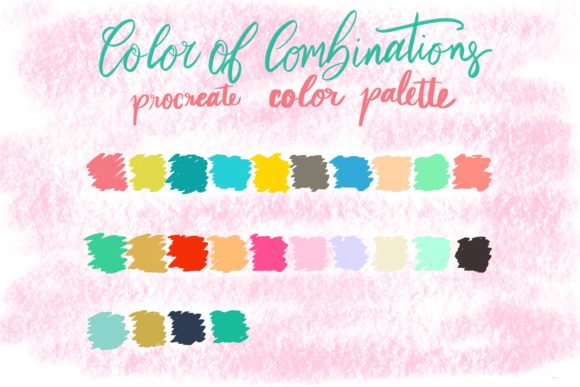
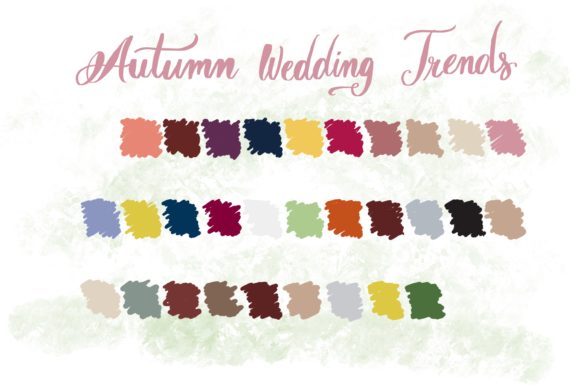
Weddings Palettes is not merely a collection of random hues; it is a thoughtfully assembled set of colors designed to reflect the sophisticated aesthetics associated with nuptial themes. These palettes typically feature soft pastels, rich jewel tones, creamy neutrals, and vibrant accents that mimic the natural beauty of floral arrangements, bridal attire, and venue decor. By importing these colors directly into Procreate, artists gain immediate access to a cohesive visual language.
The primary value proposition here is efficiency combined with aesthetic reliability. When an artist uses a professionally curated palette, they eliminate the risk of clashing colors. Every shade in the Weddings Palettes set has been selected to complement the others, ensuring that whether you are painting a delicate watercolor bouquet or designing a bold geometric invitation, the final result feels unified and polished.
Technical Compatibility and Requirements
Before diving into the creative possibilities, it is crucial to understand the technical framework required to utilize these assets effectively. The Weddings Palettes set includes a single .swatch file. This format is specific to the Procreate application, meaning these files are ONLY compatible with the Procreate app. They will not function in Photoshop, Illustrator, or other desktop-based design software without conversion.
To make the most of this resource, users must meet the following hardware and software requirements:
- iPad Pro or standard iPad: The device must be capable of running the latest version of Procreate smoothly.
- Apple Pencil or pressure-sensitive stylus: While touch input works, a pen that supports pressure sensitivity is essential for nuanced brush control and blending.
- Procreate App: This is the mandatory software environment. The .swatch file imports directly into the Procreate color library.
Understanding these limitations ensures that users do not purchase or download the file expecting universal compatibility. It is a specialized tool for a specialized platform, designed to enhance the mobile-first workflow of modern digital artists.
Practical Applications for Creators and Professionals
Who benefits most from Weddings Palettes? The answer spans a wide spectrum of creative professionals and hobbyists. Here are several real-world scenarios where these color sets prove particularly useful:
- Wedding Invitation Designers: Freelancers who create custom stationery can use these palettes to mock up designs quickly. By matching the digital colors to popular wedding trends—such as "blush and gold" or "sage and eucalyptus"—designers can present clients with realistic previews that align with current market preferences.
- Digital Illustrators: Artists creating romantic or lifestyle illustrations can use these swatches to maintain consistency across a series. For example, if you are drawing a set of characters for a wedding-themed storybook, using a unified palette ensures that each page feels part of the same narrative world.
- Social Media Content Creators: Influencers and brands in the wedding industry often need cohesive visuals for Instagram or Pinterest. Using Weddings Palettes in Procreate allows for the creation of branded graphics, quotes, and overlays that match their aesthetic identity without requiring advanced color theory knowledge.
- Hobbyists and Beginners: For those new to digital art, color selection can be intimidating. A pre-made palette removes the guesswork, allowing beginners to focus on brush techniques and composition rather than worrying about whether their purple clashes with their orange.
Enhancing Workflow Efficiency
One of the most significant advantages of using a dedicated .swatch file is the speed it adds to the workflow. In Procreate, importing a palette is a seamless process. Once loaded, the colors appear in the disc or classic view, ready for immediate use. This eliminates the need to manually input hex codes or sample colors from reference images repeatedly.
Consider a scenario where a designer is working on a tight deadline for a bridal shower invitation. Instead of experimenting with color combinations, they open Weddings Palettes, select a soft lavender and a muted gray, and begin painting. The confidence that these colors work together allows the artist to enter a state of flow, focusing on texture, lighting, and detail. This efficiency is particularly valuable for professionals who bill by the hour or manage multiple client projects simultaneously.
Evaluating Suitability for Your Projects
While Weddings Palettes offers undeniable benefits, it is important to evaluate whether it suits your specific project needs. These palettes are optimized for themes related to love, celebration, and elegance. If you are working on a high-contrast cyberpunk illustration or a gritty urban sketch, these soft, harmonious tones may not provide the visual impact you require.
However, versatility remains a key strength. Many of the colors found in wedding palettes—such as creams, navies, and dusty roses—are neutral enough to be used in broader contexts. A dusty rose can serve as a skin tone base; a navy blue can anchor a corporate logo design. The key is to view the palette not just as "wedding colors," but as a collection of sophisticated, well-balanced hues that happen to be themed around nuptials.
When deciding if this tool is right for you, consider the following questions:
- Do you frequently work on projects that require a soft, elegant, or romantic aesthetic?
- Are you looking to streamline your color selection process in Procreate?
- Do you struggle with color harmony and want a safety net of pre-tested combinations?
If the answer to any of these is yes, then integrating Weddings Palettes into your library is a logical step.
Limitations and Considerations
It is also prudent to acknowledge the limitations. As noted, the file is exclusive to Procreate. Users who switch between Procreate on iPad and Photoshop on desktop will need to manually recreate the palette in their desktop software if they wish to maintain consistency across platforms. Additionally, while the palette provides a strong foundation, it does not replace the need for understanding light and shadow. Colors will still need to be adjusted for brightness and saturation depending on the lighting conditions of your specific illustration.
Furthermore, trends in wedding colors change annually. A palette that is trendy today may feel dated in a few years. However, classic combinations tend to have longevity. Artists should view these palettes as a starting point, feeling free to tweak individual shades to better suit contemporary tastes or specific client requests.
Conclusion: A Tool for Inspired Creation
In conclusion, Weddings Palettes represents a practical solution for digital artists seeking to enhance their workflow with minimal effort. By providing a curated set of harmonious colors in a Procreate-compatible .swatch file, it bridges the gap between technical convenience and artistic expression. Whether you are a professional designer crafting invitations, an illustrator telling a romantic story, or a hobbyist exploring the joys of digital painting, this tool offers a reliable foundation for beautiful work.
The true value lies not just in the colors themselves, but in the time and mental energy saved by having them readily available. In a creative process where every decision matters, removing the friction of color selection allows artists to focus on what truly matters: bringing their unique vision to life. For iPad users equipped with an Apple Pencil and the Procreate app, Weddings Palettes is a worthy addition to their digital toolkit, offering endless possibilities for unique pictures, paintings, and design projects.