Enhancing Digital Lettering with the Glitter Gold Butter Brush for Procreate
Digital illustration and hand-lettering have evolved significantly with the advent of powerful tablet applications. Among the myriad tools available to artists, specialized brushes play a pivotal role in defining the aesthetic quality of a piece. The Glitter Gold Butter Brush for Procreate represents a niche yet impactful tool designed specifically for modern calligraphy and decorative lettering. Unlike standard round or square brushes, this asset is engineered to deliver a specific textural experience—combining the smooth flow of buttery ink with the visual sparkle of gold glitter. For designers, hobbyists, and professional illustrators, understanding the distinct characteristics of this brush is essential for determining its place within a broader digital toolkit.
Defining the Aesthetic and Functional Profile
The primary appeal of the Glitter Gold Butter Brush lies in its dual nature. Functionally, it mimics the behavior of high-quality liquid ink or paint, offering a consistent flow that is crucial for maintaining the rhythm of cursive writing. The term "butter" in its name suggests a low-friction glide across the digital canvas, allowing for seamless strokes without the jagged edges or unintended breaks that can plague lower-quality digital brushes. This smoothness is particularly important for beginners who are still developing muscle memory with an Apple Pencil, as well as for experts who require precision in complex ligatures.
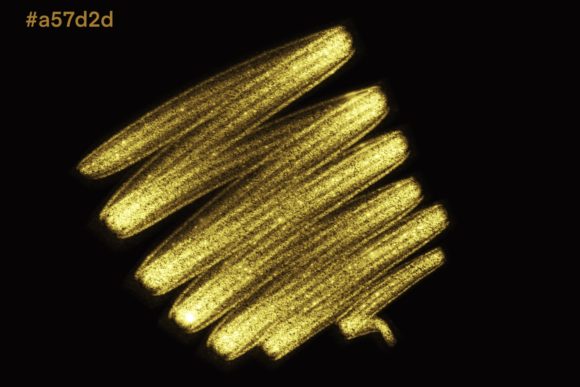
Aesthetically, the brush introduces a metallic, glittering effect that static colors cannot achieve. In traditional media, achieving a realistic gold glitter effect requires layering glue, loose glitter, and sealants—a messy and time-consuming process. The Glitter Gold Butter Brush for Procreate replicates this visual depth digitally. It is hand-drawn and designed to scatter light-reflective particles within the stroke, creating a sense of dimension and luxury. This makes it an ideal choice for projects where elegance and eye-catching detail are paramount, such as wedding stationery, holiday greeting cards, and premium brand logos.
Technical Requirements and Compatibility Constraints
Before integrating this brush into a workflow, it is critical to address its technical limitations. The Glitter Gold Butter Brush is exclusively compatible with the Procreate app on iPad devices. Specifically, it requires an iPad Pro or a compatible iPad model paired with an Apple Pencil or another pressure-sensitive stylus. This hardware dependency is not merely a suggestion but a functional necessity. The brush engine relies on pressure sensitivity data to vary the opacity, width, and density of the glitter particles. Without a stylus that communicates pressure levels, the brush cannot perform as intended, resulting in flat, uniform lines that lack the organic variation characteristic of hand-lettering.
Furthermore, users attempting to utilize this asset in other software environments, such as Adobe Photoshop on desktop or Clip Studio Paint, will find it incompatible. Procreate uses a proprietary brush file format (.brushset or .brush) that does not translate directly to other platforms. This exclusivity means that artists who work across multiple devices or prefer desktop-based workflows must consider alternative tools. For those fully invested in the Apple ecosystem, however, this limitation is negligible, as Procreate remains one of the most robust and intuitive platforms for digital painting and lettering.
Comparative Analysis: Specialized vs. General Purpose Tools
When evaluating the Glitter Gold Butter Brush for Procreate against general-purpose calligraphy brushes, several tradeoffs emerge. Standard monoline or script brushes typically offer solid colors with varying degrees of texture. They are versatile and suitable for a wide range of applications, from sketching to final rendering. In contrast, the Glitter Gold Butter Brush is highly specialized. Its strength lies in its ability to create finished, polished looks with minimal post-processing. A designer can write a quote and immediately achieve a festive, high-end appearance without needing to add separate overlay layers or adjust blending modes manually.
However, this specialization can be a limitation. If a project requires a matte finish, a watercolor effect, or a non-metallic palette, this brush is unsuitable. Artists often maintain a library of diverse brushes to handle different stylistic needs. The Glitter Gold Butter Brush should be viewed as a complementary tool rather than a standalone solution. It excels in accentuating specific elements—such as highlighting key words in a quote design or adding borders to invitation cards—rather than serving as the primary tool for entire illustrations.
Another point of comparison is the difference between pre-made textured brushes and custom-created effects. Advanced users might attempt to replicate the gold glitter look by using standard brushes combined with noise filters, particle overlays, and layer styles. While this approach offers greater control over the size and distribution of glitter particles, it is significantly more time-consuming. The Glitter Gold Butter Brush streamlines this process, offering a "what you see is what you get" experience that enhances productivity. For professionals working under tight deadlines, such as those creating seasonal marketing materials or last-minute event signage, this efficiency is a significant advantage.
Practical Use Cases and Best-Fit Scenarios
Identifying the right context for using the Glitter Gold Butter Brush for Procreate can maximize its value. The following scenarios represent ideal use cases where this tool shines:
- Wedding and Event Stationery: The elegant, shimmering quality of the brush aligns perfectly with the sophisticated aesthetics of wedding invitations, save-the-date cards, and menu designs. It adds a touch of luxury that resonates with formal events.
- Social Media Graphics: In the crowded landscape of Instagram and Pinterest, visuals that catch the light stand out. Quote designs and promotional graphics created with this brush can increase engagement by drawing the viewer’s eye to specific messages.
- Logo Design for Boutique Brands: Small businesses in the beauty, fashion, or lifestyle sectors often seek branding that conveys elegance and exclusivity. A logo featuring hand-lettered gold glitter elements can effectively communicate these brand values.
- Holiday and Seasonal Cards: During festive seasons like Christmas, New Year’s, or Diwali, gold accents are culturally and visually relevant. This brush allows for rapid creation of themed greetings that feel warm and celebratory.
In each of these examples, the brush serves not just as a drawing tool but as a stylistic shortcut. It enables creators to produce high-value visuals without extensive technical manipulation, making it accessible to both novice designers and seasoned professionals.
Limitations and Considerations for Decision Making
While the Glitter Gold Butter Brush for Procreate offers distinct benefits, potential users should be aware of its constraints. One notable limitation is the potential for visual overload. Because the brush is inherently bold and textured, it can dominate a composition if used excessively. Designers must exercise restraint, employing the brush for emphasis rather than as a default text style. Pairing it with clean, sans-serif fonts or simple background elements often yields the best results, ensuring that the glitter effect enhances rather than overwhelms the design.
Additionally, the digital nature of the glitter effect means it may appear differently on various screens. Calibration issues on different iPad models or monitor settings can alter the perceived brightness and contrast of the gold particles. Designers intending to print their work must also consider how metallic effects translate to physical media. Standard printers cannot reproduce true metallic ink; therefore, digital files created with this brush may require special printing techniques, such as foil stamping, to achieve a similar effect in print. For purely digital outputs, however, the brush performs exceptionally well.
Making an Informed Choice
Deciding whether to incorporate the Glitter Gold Butter Brush for Procreate into your workflow depends on your specific creative goals and technical setup. If you primarily work on an iPad with Procreate and frequently create content related to luxury, celebration, or elegance, this brush is a valuable addition. It offers a unique combination of smooth handling and striking visual impact that is difficult to replicate with standard tools. However, if your work leans towards minimalist design, technical illustration, or non-metallic aesthetics, other brushes may better serve your needs.
Ultimately, the Glitter Gold Butter Brush for Procreate is a specialized instrument designed for a specific artistic voice. By understanding its capabilities, compatibility requirements, and ideal use cases, artists can make informed decisions about when and how to leverage its potential. Whether used for jazzing up a home workspace with digital art or creating professional-grade commercial designs, this tool provides a reliable means to add a touch of golden elegance to digital creations.