Elevating Athletic Imagery: A Guide to Gym Fitness Lightroom Presets
In the visually driven landscape of modern fitness marketing and personal branding, the quality of your imagery can be just as critical as the quality of your workout routine. Whether you are a professional photographer capturing high-intensity interval training sessions, a gym owner promoting facility amenities, or a fitness influencer curating a cohesive social media feed, consistency is key. This is where Gym Fitness Lightroom Presets become an indispensable asset in your digital workflow. These tools offer a streamlined approach to photo editing, allowing creators to achieve a polished, professional aesthetic with minimal effort while maintaining the authenticity of the moment captured.
The Role of Consistency in Fitness Photography
Fitness photography is distinct from other genres due to its emphasis on energy, movement, and physical definition. The lighting in gyms can often be challenging, ranging from harsh overhead fluorescents to dim, moody ambient light in boutique studios. Without a standardized editing process, a portfolio or social media grid can appear disjointed, with varying color temperatures and exposure levels that distract from the subject matter. By utilizing specialized presets, photographers and content creators ensure that every image shares a common visual language. This consistency builds brand recognition and trust, signaling to viewers that the content is curated and professional.
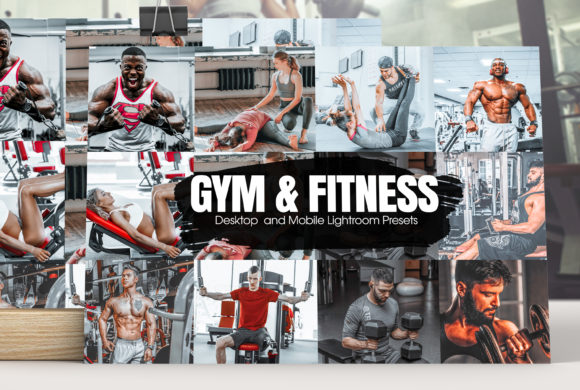
These presets are the perfect tool for everyone who wants to enhance their photos, providing a foundational edit that aligns with the gritty, energetic, or clean aesthetics commonly associated with athletic environments. The presets will edit your pictures with a specific and unique look, ensuring that skin tones remain natural while enhancing the contrast and clarity that highlight muscle definition and equipment details. Each preset has its own style, ranging from high-contrast monochrome looks that emphasize form and shadow, to vibrant, saturated styles that pop against the neutral backgrounds of many modern gyms.
Understanding the Technical Advantages
One of the primary benefits of using pre-configured editing settings is efficiency. In a fast-paced environment like a cross-fit competition or a busy commercial gym, photographers may capture hundreds of images in a single session. Manually adjusting exposure, contrast, highlights, shadows, whites, blacks, clarity, and vibrance for each individual photo is time-consuming and prone to human error. Each preset has been crafted to look great with a wide variety of images, serving as a robust starting point that significantly reduces post-production time. In many instances you will be able to get a great result with a single click, allowing you to focus more on shooting and less on sitting behind a computer screen.
However, it is crucial to understand that presets are not a "set it and forget it" solution for every scenario. While they provide an excellent baseline, photography is inherently variable. However, you can always make adjustments to suit individual photos. Factors such as the direction of light, the color of the gym equipment, and the athlete's attire can influence how a preset applies to a specific image. A preset designed for a bright, window-lit yoga studio may need slight exposure reduction when applied to a dark weightlifting zone. The flexibility to tweak these settings ensures that the final output remains true to the vision while benefiting from the speed of automated editing.
Accessibility and Software Compatibility
A common misconception among aspiring photographers and hobbyists is that professional-grade editing requires expensive, subscription-based software. This barrier to entry has historically limited the ability of smaller creators to produce high-quality content. Modern preset packs address this by offering versatile file formats that cater to different user needs and budget constraints. Specifically, the availability of DNG (Digital Negative) files has democratized high-end editing.
No Creative Cloud Subscription Required for many of these workflows. You’ll get both native and DNG mobile presets, providing flexibility regardless of your preferred device or software ecosystem. You can use the DNG presets even without a subscription, utilizing free mobile apps like Adobe Lightroom Mobile to apply professional-grade edits directly from your smartphone. This is particularly advantageous for fitness influencers and gym-goers who capture content on the fly and wish to publish it immediately without transferring files to a desktop computer.
For those who do have access to the full Adobe ecosystem, the options expand further. If you are a subscriber, use the native mobile presets to unlock the opacity amount setting. This feature allows for nuanced control over the intensity of the effect, enabling users to blend the preset with the original image to achieve a more subtle or customized look. This level of control is essential for maintaining realism, especially when dealing with diverse skin tones and complex lighting scenarios common in athletic photography.
Navigating Lighting and Environmental Variables
While presets offer a powerful shortcut, understanding the interplay between your editing tools and your source material is vital for professional results. Keep in mind that all presets work differently with each photo depending on a number of factors such as lighting, white balance, tone etc. For instance, a preset calibrated for cool, blue-toned LED lighting may cast an unnatural hue on subjects photographed under warm incandescent bulbs. In such cases, adjusting the white balance and temperature sliders before or after applying the preset can correct color casts and ensure accurate skin representation.
Furthermore, the dynamic range of gym environments presents unique challenges. High-contrast scenes, where bright windows juxtapose with dark equipment, require careful handling of highlights and shadows. A well-crafted fitness preset will typically balance these elements to retain detail in both the brightest and darkest areas. However, extreme lighting conditions may necessitate manual recovery of blown-out highlights or lifted shadows to prevent loss of detail. Recognizing when a preset needs supplementary adjustment is a skill that develops with practice and observation.
Practical Applications for Different Users
The utility of Gym Fitness Lightroom Presets extends across various segments of the fitness industry. For personal trainers and coaches, consistent imagery helps in building a recognizable personal brand on platforms like Instagram and TikTok. High-quality, uniformly edited photos convey professionalism and attention to detail, qualities that potential clients look for when selecting a coach.
For gym owners and marketing teams, these presets streamline the production of promotional materials. From website banners to email newsletters, having a library of consistently edited images ensures that all marketing channels reflect the same brand identity. This cohesion strengthens brand recall and creates a more immersive experience for prospective members browsing online.
Photographers specializing in sports and fitness can also benefit significantly. By establishing a signature look through custom or curated presets, they can differentiate themselves in a competitive market. Clients often seek photographers whose editing style aligns with their brand aesthetic, and having a reliable preset workflow allows photographers to deliver consistent results across large batches of images, improving client satisfaction and turnaround times.
Maximizing the Potential of Your Edits
To get the most out of your presets, it is advisable to shoot in RAW format whenever possible. RAW files contain more data than JPEGs, providing greater flexibility in post-processing. This extra data allows for more aggressive adjustments to exposure and color without introducing artifacts or banding. When applying presets to RAW files, the results are typically cleaner and more adaptable to fine-tuning.
Additionally, consider creating your own variations based on the presets you purchase or download. By saving your adjusted settings as new user presets, you can build a personalized library that caters specifically to the lighting conditions and aesthetic preferences of your usual shooting environments. This iterative process not only enhances your efficiency but also helps you develop a deeper understanding of color grading and tonal adjustment.
In conclusion, integrating Gym Fitness Lightroom Presets into your workflow offers a compelling blend of speed, consistency, and professional quality. Whether you are using mobile DNG files for quick social media updates or native presets for detailed desktop editing, these tools empower you to elevate your visual content. By combining the convenience of one-click edits with the discernment to make necessary adjustments, you can create striking, cohesive imagery that captures the intensity and spirit of fitness culture.