The Procreate Crayon Box: Digital Texture Made Simple
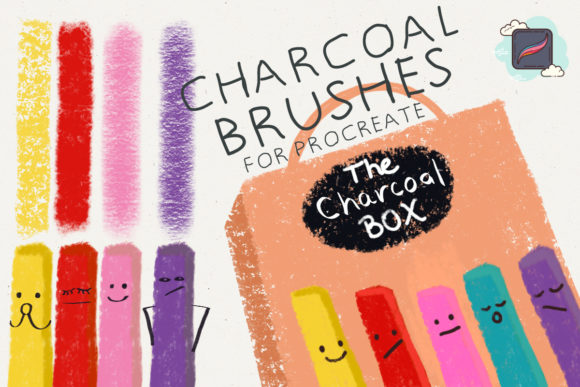
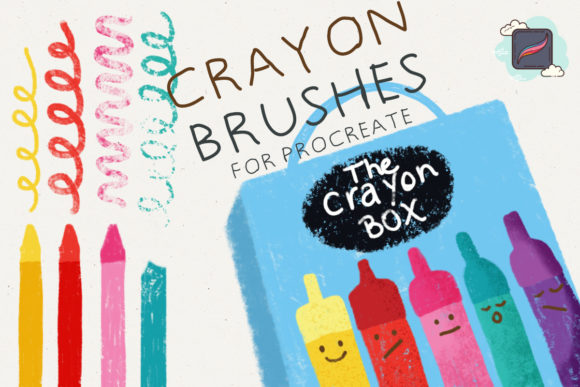
There is a distinct charm to the imperfect, textured look of traditional wax crayons. The way the pigment catches on the grain of paper, leaving tiny white specks and uneven edges, creates a sense of nostalgia and warmth that is difficult to replicate digitally. For artists, designers, and content creators who love this aesthetic but prefer the convenience of an iPad, The Procreate Crayon Box offers a seamless solution. This digital download provides a curated set of ten specialized brushes designed to emulate the authentic behavior of crayons, allowing you to bring that handmade feel into your digital workflow without the mess or physical limitations.
Why Choose Digital Crayons?
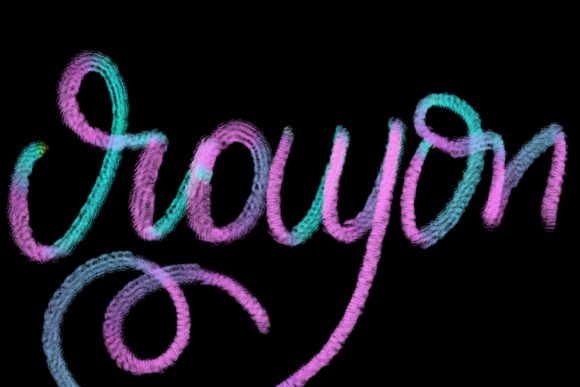
Switching from physical media to digital tools often raises concerns about losing the organic touch. Many standard digital brushes feel too smooth, sterile, or uniform. They lack the friction and resistance that give traditional art its character. The primary appeal of The Procreate Crayon Box lies in its ability to bridge this gap. By mimicking the specific texture of wax on paper, these brushes allow for a more expressive and tactile drawing experience.
For professionals and hobbyists alike, this means you can achieve a hand-drawn look while retaining all the benefits of digital art. You can undo mistakes instantly, work in layers, adjust colors with precision, and share your work globally in seconds. Whether you are illustrating a children’s book, designing social media graphics, or creating educational materials, the ability to toggle between clean vector-like lines and rough, textured strokes adds significant versatility to your toolkit.
What Is Included in the Set?
This product is a straightforward digital asset pack. Upon purchase, you receive a file that installs directly into the Procreate app on your iPad. The core of the package is a set of 10 Procreate brushes, each engineered to simulate different aspects of crayon usage. Rather than offering a single generic tool, this variety allows you to replicate various techniques:
- Soft Blending: Brushes that mimic the way crayons layer and mix when rubbed together.
- Hard Edges: Tools that create sharp, defined lines similar to a newly sharpened crayon.
- Textured Fill: Brushes designed for coloring large areas while maintaining the characteristic paper grain effect.
- Scumbling and Sketching: Lighter, scratchier options for initial sketches or adding depth through cross-hatching.
Because these are custom-built for Procreate, they respond naturally to pressure and tilt. Press harder, and the color becomes denser and more opaque. Use the side of your stylus, and you get a broader, softer stroke, just like using the side of a real crayon stick.
Practical Uses for Creators and Businesses
The versatility of these brushes extends far beyond simple doodling. Here is how different users can integrate The Procreate Crayon Box into their daily workflows:
Content Creation and Marketing
In a digital landscape saturated with polished, high-gloss imagery, handmade aesthetics stand out. Social media managers and bloggers can use these brushes to create eye-catching quotes, infographics, or story highlights. A hand-drawn arrow or a textured background can make a brand feel more approachable and authentic. For small business owners, adding a crayon-style sketch to product packaging designs or thank-you cards can enhance the perceived value and personal touch of their brand.
Educational Materials
Teachers and educators often find that students engage more deeply with materials that look friendly and informal. Using these brushes to create worksheets, flashcards, or presentation slides can make learning feel less rigid. The crayon texture is particularly effective for early childhood education resources, as it mirrors the tools children use in the classroom, creating a familiar and comforting visual language.
Illustration and Storytelling
For illustrators, especially those working in children’s literature, the crayon look is a classic choice. It evokes innocence and creativity. With this brush set, you can draft characters and backgrounds that look like they were pulled straight from a sketchbook. The ability to layer colors allows for complex shading and depth, enabling professional-grade illustrations that retain a playful spirit.
Getting Started: Installation and Tips
One of the biggest advantages of this product is its ease of use. Since it is a digital download, there is no shipping wait time. In order to use the product, all you need to do is download the file and install it in Procreate. The process typically involves tapping the file on your iPad and selecting "Open in Procreate," which automatically imports the brushes into your library.
Once installed, here are a few tips to maximize your results:
- Choose the Right Paper Texture: While the brushes emulate crayon marks, pairing them with a textured canvas in Procreate enhances the realism. Look for paper textures with visible grain to let the brush strokes interact naturally with the surface.
- Experiment with Opacity: Real crayons are rarely 100% opaque in a single pass. Lowering the opacity of your brush allows for building up color gradually, creating richer, more nuanced tones.
- Use Layers Wisely: Keep your sketch on one layer and your coloring on another. This allows you to refine your lines without disturbing your textured fills. You can also use blending modes like "Multiply" to simulate how wax layers interact.
- Color Selection Matters: Crayons have a distinct waxy vibrancy. Avoid overly neon or digital-looking colors. Instead, opt for slightly muted, earthy, or pastel tones to maintain the authentic feel.
Important Considerations Before You Buy
While The Procreate Crayon Box is a powerful tool, it is important to have realistic expectations. These brushes are designed specifically for the Procreate ecosystem. If you use other digital art software like Photoshop or Clip Studio Paint, this file will not be compatible. Ensure you have an iPad with Procreate installed before purchasing.
Additionally, while the brushes emulate texture, the final result depends heavily on your hardware. Using a stylus with good pressure sensitivity, such as the Apple Pencil, will yield the best results. Finger drawing may not capture the subtle variations in line weight and texture that these brushes offer.
Finally, remember that mastering any new tool takes practice. The first few strokes might feel different from what you are used to if you are transitioning from standard digital brushes. Take time to play with the settings, adjust the size, and test how each of the ten brushes behaves with different colors. The goal is not perfect replication of physical crayons, but rather capturing the spirit and emotion of the medium in a flexible digital format.
By integrating The Procreate Crayon Box into your creative routine, you open up new possibilities for expression. It allows you to slow down, embrace imperfection, and create work that feels human, warm, and inviting. Whether you are a seasoned pro looking to expand your style or a beginner eager to explore digital art without a steep learning curve, this set provides the perfect starting point for textured, nostalgic creativity.