Pumpkin and Caterpillar Photoshop Brush: Integrating Whimsical Assets into Professional Design Workflows
In the fast-paced world of digital design, efficiency often clashes with creativity. Professionals, from freelance illustrators to small business owners marketing seasonal products, constantly seek tools that bridge this gap. The Pumpkin and Caterpillar Photoshop Brush represents more than just a decorative element; it is a strategic asset for streamlining autumn-themed creative projects. By understanding how to integrate this specific digital product into your broader workflow, you can enhance productivity while maintaining high artistic standards.
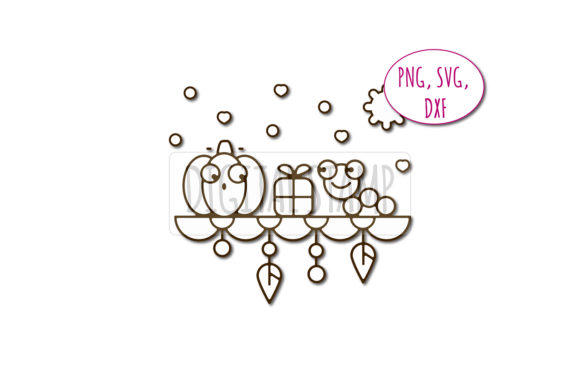
This digital package includes eight files, offering versatility across multiple platforms. With formats including PNG, SVG, DXF, and an ABR brush file, the asset is designed for immediate implementation in various stages of the design process. Whether you are preparing print-on-demand merchandise, creating educational materials, or designing social media content, knowing how to leverage these files effectively can significantly reduce production time.
Understanding the Asset Structure and Compatibility
Before diving into creation, it is essential to understand the technical composition of the Pumpkin and Caterpillar bundle. The inclusion of four distinct file types ensures compatibility with a wide range of software ecosystems. The ABR file is specifically tailored for Adobe Photoshop, allowing users to stamp the illustration repeatedly with varying opacity and flow settings. This is particularly useful for creating textured backgrounds or patterned layouts without manually placing individual elements.
The PNG files, saved with transparent backgrounds, are ready-to-use assets for any raster-based editing software. Their approximate size of 11×7 inches provides sufficient resolution for high-quality prints, ensuring that pixelation is not a concern for standard merchandise or poster designs. For vector-based workflows, the SVG and DXF files are indispensable. These formats allow for infinite scalability without loss of quality, making them ideal for large-format printing or precise cutting machines used in craft businesses.
When organizing your digital library, categorize these files by format and project type. Keeping the ABR brush separate from the static image files prevents confusion during rapid prototyping. Establishing a consistent folder structure for your digital assets reduces the time spent searching for resources, a critical factor in maintaining momentum during tight deadlines.
Pre-Production: Planning and Conceptual Integration
Effective use of the Pumpkin and Caterpillar Photoshop Brush begins before you open your design software. During the planning phase, consider the narrative role of the illustration. The theme—an autumn story featuring friends—suggests warmth, nostalgia, and approachability. This makes the asset suitable for brands aiming to humanize their image or educators looking to engage younger audiences with friendly visuals.
Evaluate your project requirements against the asset’s capabilities. If your goal is to create a seamless pattern for fabric printing, the SVG format may be preferable due to its clean lines and editability. Conversely, if you are designing a quick social media graphic, the PNG or ABR brush will offer faster deployment. Deciding on the primary output format early in the process prevents unnecessary conversions and maintains the integrity of the original artwork.
Consider the color palette of your overall project. Since the drawings are provided in a format suitable for self-coloring, you have the flexibility to adapt the hues to match specific brand guidelines or seasonal trends. This adaptability is a key advantage over rigid, pre-colored stock images. Plan your color strategy in advance to ensure consistency across all deliverables.
Execution: Workflow Implementation Tips
Once the planning phase is complete, the execution stage involves integrating the asset into your design environment. For Photoshop users, installing the ABR brush is straightforward but requires attention to detail. Ensure that the brush settings are calibrated to your tablet’s pressure sensitivity if you are using one. This allows for dynamic variation in the stamped images, adding a hand-drawn feel to digital compositions.
- Layer Management: Always place the pumpkin and caterpillar elements on separate layers. This non-destructive approach allows for easy adjustments to position, size, and color without affecting other design components.
- Colorization Techniques: Use adjustment layers such as Hue/Saturation or Color Overlay to change the colors of the PNG or brush stamps. This method preserves the original texture and shading of the illustration.
- Vector Editing: When using the SVG or DXF files in programs like Adobe Illustrator or CorelDRAW, ungroup the elements to manipulate the pumpkin and caterpillar independently. This level of control is crucial for customizing the composition to fit specific layout constraints.
For those utilizing cutting machines, the DXF file is the optimal choice. Import the file into your cutting software, ensuring that the lines are closed and continuous for smooth cutting paths. Test cuts on scrap material are recommended to verify the machine’s handling of the intricate details in the caterpillar’s segments and the pumpkin’s ridges.
Post-Production and Quality Control
After the initial design is assembled, rigorous quality control ensures the final output meets professional standards. Check the resolution of PNG files when scaling them up for larger prints. Although the original size is 11×7 inches, excessive enlargement can lead to softness. If larger dimensions are required, consider using the SVG version and re-exporting at the desired resolution.
Verify color accuracy across different devices and print proofs. Screens often display colors differently than printers, especially with vibrant autumn tones like oranges and deep greens. Calibrating your monitor and requesting physical proofs can prevent costly errors in mass production. Additionally, ensure that the transparent backgrounds in PNG files are clean, with no stray pixels or halos around the edges, which can detract from the professionalism of the final piece.
Strategic Use Cases for Entrepreneurs and Educators
The versatility of the Pumpkin and Caterpillar asset extends beyond simple decoration. For entrepreneurs, particularly those in the print-on-demand sector, this bundle offers a quick route to market. By combining the brush with typography, you can create unique t-shirt designs, mugs, or tote bags that resonate with the autumn season. The ability to recolor the illustrations allows for the creation of multiple variations from a single source file, maximizing the return on investment.
Educators and publishers can utilize these assets to create engaging learning materials. The friendly nature of the characters makes them ideal for storytelling apps, worksheets, or classroom decorations. The self-coloring aspect encourages interactive participation, allowing students to personalize their learning experience. By integrating these illustrations into lesson plans, educators can foster creativity while reinforcing seasonal themes.
Bloggers and content creators can use the PNG files to break up text-heavy articles, adding visual interest without overwhelming the reader. The transparent background ensures that the images blend seamlessly with any website theme, maintaining a cohesive aesthetic. Consistent use of such branded or themed assets helps in building a recognizable visual identity across digital platforms.
Long-Term Value and Asset Management
Investing in high-quality digital assets like the Pumpkin and Caterpillar Photoshop Brush yields long-term benefits when managed correctly. Store the original files in a secure, backed-up location to prevent data loss. Document the usage rights and licensing terms associated with the purchase to ensure compliance in commercial projects.
Over time, build a library of similar assets categorized by theme, season, and style. This organized approach facilitates quicker retrieval and encourages the mixing and matching of elements for new creative combinations. Regularly review your asset library to identify gaps and opportunities for expansion, ensuring that your toolkit remains relevant and diverse.
In conclusion, the Pumpkin and Caterpillar digital product is a practical tool for enhancing creative workflows. By understanding its technical specifications, planning its integration, and executing with precision, designers and creators can achieve efficient, high-quality results. Whether for commercial ventures or educational purposes, this asset supports a streamlined process that values both creativity and productivity.