Bright Palettes: Elevate Your Procreate Art
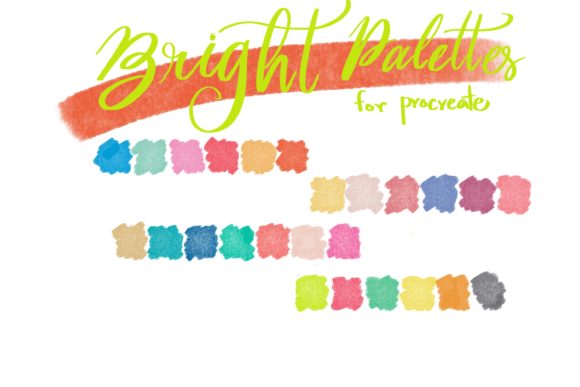
Digital illustration thrives on color. While technical skill defines the lines and shapes, it is the palette that sets the mood, directs the viewer’s eye, and ultimately determines whether a piece feels flat or vibrant. For artists working within the iPad ecosystem, finding the right set of hues can often be more time-consuming than the drawing process itself. This is where Bright Palettes steps in as an essential tool for modern creators. Designed specifically for the Procreate app, this curated collection offers a streamlined approach to color selection, allowing you to focus less on mixing and more on creating.
Why Curated Color Sets Matter in Digital Art
Many digital artists fall into the trap of "color wheel fatigue." Spending twenty minutes trying to find the perfect shade of teal or a complementary orange can break your creative flow. Pre-made palettes solve this problem by providing a harmonious starting point. Bright Palettes is not just a random assortment of neon shades; it is a thoughtfully constructed resource that ensures color harmony from the first stroke.
When you use a cohesive palette, your artwork naturally gains a sense of unity. Whether you are designing a character, illustrating a children’s book, or creating social media graphics, consistent color usage strengthens brand identity and visual appeal. By importing a .swatch file like this one, you eliminate the guesswork. You get immediate access to colors that have been tested for vibrancy and compatibility, ensuring that what you see on your screen translates well across different digital platforms.
Key Characteristics of Bright Palettes
The primary strength of this collection lies in its simplicity and specificity. It comes as a single .swatch file, which is the native format for Procreate color libraries. This means there is no complex installation process or third-party software required. The integration is seamless, keeping your workflow uninterrupted.
- Vibrancy and Saturation: As the name suggests, these colors lean towards the brighter end of the spectrum. They are ideal for projects that need to pop, such as marketing materials, pop-art styles, or energetic character designs.
- Procreate Native Compatibility: The file is engineered exclusively for the Procreate environment. This ensures that the color values remain accurate and that the library loads quickly within the app’s interface.
- Curated Harmony: Unlike generating random colors, this set provides hues that work well together. This reduces the cognitive load on the artist, allowing for faster decision-making during the creative process.
Practical Applications for Professionals and Hobbyists
The versatility of Bright Palettes makes it suitable for a wide range of users, from freelance illustrators to marketing entrepreneurs. Here is how different creators can leverage this tool in their daily workflows.
For Graphic Designers and Marketers
In the world of digital marketing, attention is currency. Bright, eye-catching visuals perform significantly better on social media feeds than muted or dull imagery. Entrepreneurs and marketers can use this palette to create engaging Instagram stories, Pinterest pins, or ad creatives that stand out. The high saturation levels ensure that text overlays remain readable against colorful backgrounds, enhancing overall communication effectiveness.
For Illustrators and Concept Artists
Character designers often struggle with creating distinct looks for multiple characters in a single project. Using a shared bright palette can help maintain visual consistency across a series while allowing for variation through value and temperature shifts. Additionally, concept artists working on sci-fi or fantasy themes can use these vibrant tones to depict magical effects, futuristic interfaces, or alien landscapes that require a non-naturalistic color approach.
For Educators and Content Creators
Educational materials benefit greatly from clear, engaging visuals. Teachers and online course creators can use Bright Palettes to design worksheets, presentation slides, or explainer videos. The cheerful nature of the colors helps maintain student engagement and makes complex information feel more approachable. Bloggers and publishers can also utilize these swatches to create custom headers and featured images that align with a lively, optimistic brand voice.
Technical Requirements and Setup
To make the most of this resource, it is crucial to understand the technical ecosystem it operates within. Bright Palettes is not a standalone application; it is a plugin-style asset for Procreate. Therefore, specific hardware and software are required.
First, you must have an iPad capable of running the latest versions of Procreate. While an iPad Pro offers the best performance due to its superior display color accuracy and processing power, other iPad models that support the Apple Pencil will also work. Speaking of input, an Apple Pencil or a third-party stylus with pressure sensitivity is highly recommended. Pressure sensitivity allows for nuanced brush strokes, which interact dynamically with the bright colors, creating depth and texture that flat mouse clicks cannot achieve.
Finally, the Procreate App itself is mandatory. This palette will not work in Photoshop, Clip Studio Paint, or other desktop-based software. It is a specialized tool for the iPad art community. Before purchasing or downloading, ensure your Procreate app is updated to the latest version to avoid any compatibility issues with the .swatch file format.
Maximizing Efficiency in Your Workflow
Integrating Bright Palettes into your routine can significantly boost productivity. Here are a few tips to get the best results:
- Import Early: Load the .swatch file at the beginning of your project. Having the colors readily available in your library prevents the temptation to stray into discordant hues mid-drawing.
- Experiment with Blending Modes: Bright colors can sometimes appear overpowering. Use Procreate’s layer blending modes, such as Multiply or Overlay, to soften the intensity while maintaining the vibrancy of the underlying palette.
- Create Variations: Use the color picker to slightly adjust the brightness or saturation of the base swatches. This allows you to expand the palette without losing the original harmonic structure.
- Test on Different Backgrounds: Bright colors behave differently depending on the background. Test your palette against both white and dark backgrounds to ensure readability and visual balance.
Final Thoughts on Color Strategy
Color is more than just aesthetics; it is a functional component of design that influences perception and emotion. Bright Palettes offers a practical, efficient solution for artists who want to inject energy and professionalism into their digital work. By removing the friction of color selection, it empowers creators to spend more time doing what they love: drawing, painting, and designing. Whether you are a seasoned professional looking to speed up your client work or a hobbyist eager to explore new styles, this tool provides a solid foundation for vibrant, impactful art.
Remember, the best palette is one that serves your vision. While Bright Palettes provides the hues, your creativity provides the soul. Combine this resource with your unique style and technical skills, and you will find yourself producing work that is not only visually striking but also emotionally resonant.